
Participant
February 6, 2018
Answered

opening Adobe Stock .ai files in Photoshop Elements 15

  • February 6, 2018
  • 1 reply
  • 1765 views

Recently updated from Windows 7 to Windows 10.
Installed Photoshop Elements 15, it seems to be working normally.
It will convert .ai files I have generated in Adobe Illustrator CC.
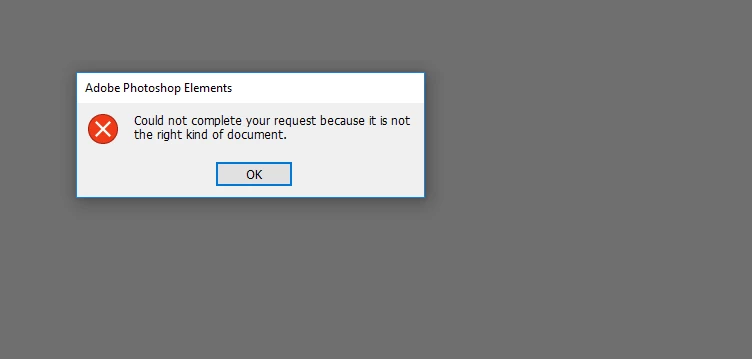
However, when our marketing director sends me Adobe Stock files in .ai format I receive an error message.
*I have also tried downloading these files directly and still have the same error

Elements 15 on a PC running Windows 10 Pro.
This topic has been closed for replies.
Correct answer Jeff Arola

Adobe removed that ability in photoshop elements versions since pse 12 won't open AI (adobe illustrator files) unless Create PDF Compatible File is enabled in the iilustrator file saving ai options, so the Adobe Stock AI files are saved without an pdf compatible file and pse 15 won't open those.

You can open the received Adobe Stock AI files into illustrator and save them out as ai files with the Create PDF compatible file checked, which then pse 15 will open.

Also, i guess your aware that opening AI files into photoshop elements or photoshop rasterizes the files and they are no longer vector, so if they need to be kept vector, using illustrator for your editing would be more prudent.

1 reply

Jeff Arola
Community Expert
Jeff ArolaCommunity ExpertCorrect answer
Community Expert
February 6, 2018

Adobe removed that ability in photoshop elements versions since pse 12 won't open AI (adobe illustrator files) unless Create PDF Compatible File is enabled in the iilustrator file saving ai options, so the Adobe Stock AI files are saved without an pdf compatible file and pse 15 won't open those.

You can open the received Adobe Stock AI files into illustrator and save them out as ai files with the Create PDF compatible file checked, which then pse 15 will open.

Also, i guess your aware that opening AI files into photoshop elements or photoshop rasterizes the files and they are no longer vector, so if they need to be kept vector, using illustrator for your editing would be more prudent.