Answered
Opening, viewing and editing in PDE 2024
How do you open, view and edit multiple images in PSE 2024 in the same workspace? In PSE 11 we could open multiple PDFs and blank files and view in the same workspace.

How do you open, view and edit multiple images in PSE 2024 in the same workspace? In PSE 11 we could open multiple PDFs and blank files and view in the same workspace.
Well, I'll assume something different.
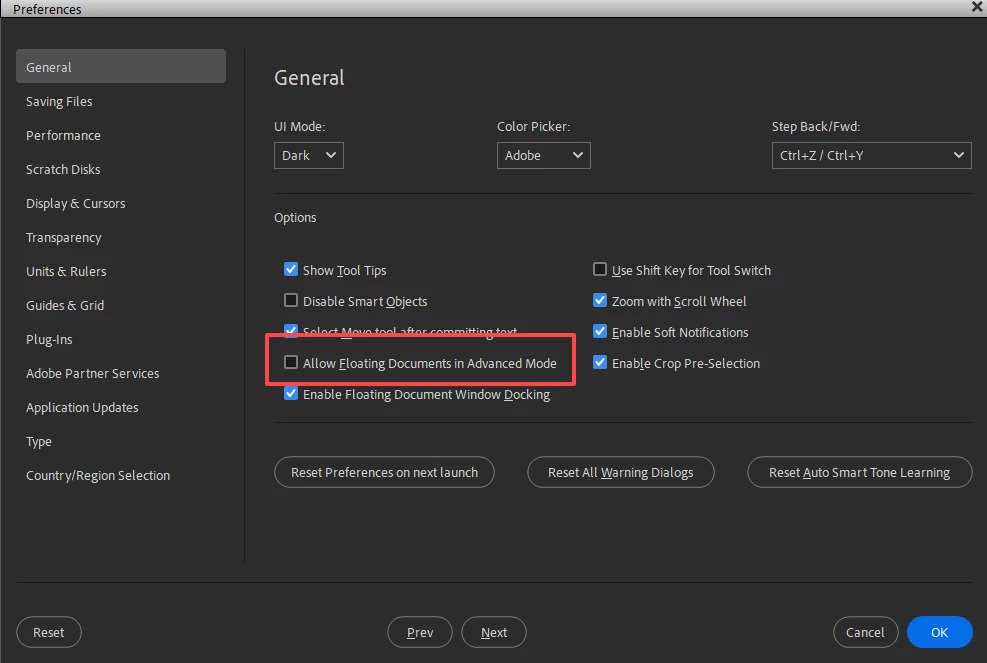
Go to Edit>Preferences>General and check the box to Allow Floating Documents in Advanced Mode. I believe this was the option that was on by default in Elements 11. That behavior changed to off by default several versions ago.
Already have an account? Login
Enter your E-mail address. We'll send you an e-mail with instructions to reset your password.


 AdChoices