Inspiring
Nov 13, 2023 10:24 AM UTC
Answered

Organiser display

When I open Elements organiser some of the photos have been revolved through 90 degrees. How can I stop this happening please?

This topic is closed to new replies. Start a new post to keep the conversation going.
Greg_S.
Greg_S.Correct answer
Community Expert
Nov 15, 2023 7:33 PM UTC

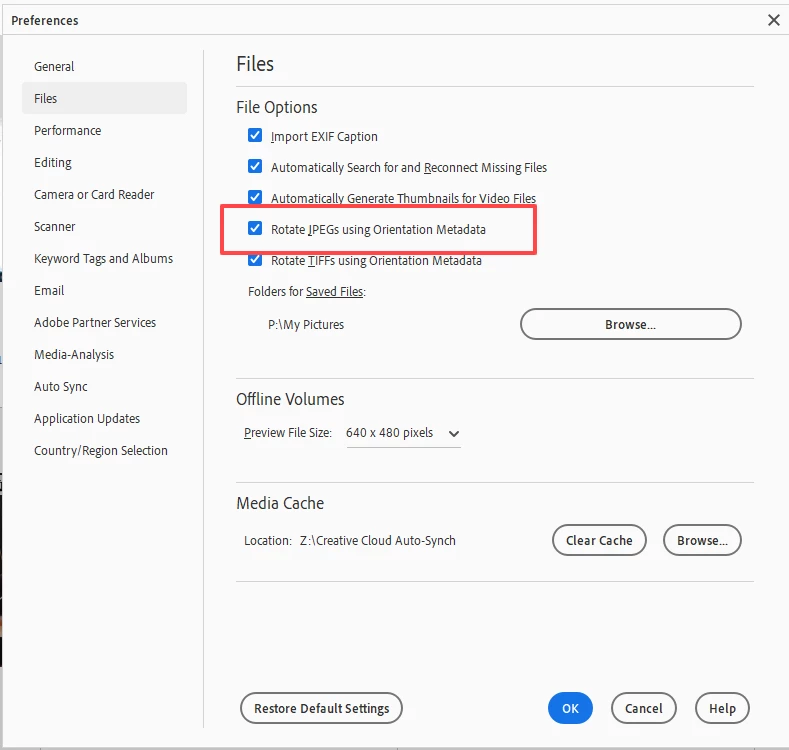
Under Edit>Preferences>Files, do you have the box checked to rotate jpegs using orientation metadata?  I believe this is normally on by default.  Perhaps you accidentally changed it?


5 replies

Greg_S.
Community Expert
Greg_S.Community ExpertCorrect answer
Community Expert
Nov 15, 2023 7:33 PM UTC

Under Edit>Preferences>Files, do you have the box checked to rotate jpegs using orientation metadata?  I believe this is normally on by default.  Perhaps you accidentally changed it?


Translate
Adobe Employee
Nov 15, 2023 7:04 AM UTC

Hi @francisc75144729 

Can you provide the steps and file format that are causing the problem?

Translate
Inspiring
Nov 15, 2023 8:35 AM UTC

Hi Pradeepkmr and thanks for responding.

All my photos are stored as .jpeg files and I have a large number of folders (different topics, venues etc.) in the system. When I open one of the folders in Elements Organiser there will be the majority of pictures in landscape format but some will be in portrait.  For some reason since installing Elements 24 all the portraits have been revolved into landscapes.  Yes there is a button that I can click to revolve them back the right way but I would prefer to be able to switch off whatever it is the the Elements program that makes this happen in the first place and I certainly would expect it to be able to remember in some way when I have made the correction so I do not have to do it every time I open Elements organiser and go to the same folder.  Any help would be very welcome please.

Translate
Greg_S.
Community Expert
Community Expert
Nov 13, 2023 3:07 PM UTC

What OS and version of Elements are you using? Are the files   .heic files from an iPhone?

Translate
Inspiring
Nov 13, 2023 3:21 PM UTC

Hi Greg and thanks for responding.  Windows 11 23H2 Elements 24 and I've never had an iPhone

Francis

Translate