
January 25, 2026
Answered

Organizer 2026 not enabling album category

  • January 25, 2026
  • 1 reply
  • 32 views

Organizer 2026 documentation says we can :

  • create new category of album
  • attribute a category to an album

when i make add (+) in album left window, Organizer does not propose anything else than a new album in right window as per attachement.

what is the procedure?

note: I have backed up a catalog from organizer 2019 and restored it on organizer 2026. all data seems correct (faces, notes...)  Is there specific actions when restoring a catalog from older version?

thanks for your help
Correct answer 99jon

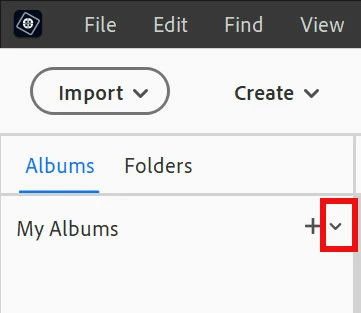
See image below. In the left-hand Albums panel click the pull down menu (to the right of the + icon) and choose New Album Category.


Create a name for your category (parent) album and click OK.


You should be able to drag and drop any regular album into the parent album.


Parent.jpg


1 reply

99jon
99jonCorrect answer
Legend
January 26, 2026

See image below. In the left-hand Albums panel click the pull down menu (to the right of the + icon) and choose New Album Category.


Create a name for your category (parent) album and click OK.


You should be able to drag and drop any regular album into the parent album.


Parent.jpg


lesecrinsAuthor
January 26, 2026

thank you very much for your help , I was lost on the right side of the display 🙂