


Inspiring
November 29, 2025
Answered

Organizer '26: suppress display of cloud content in specific catalogs?

  • November 29, 2025
  • 1 reply
  • 115 views

I have a tiny amount of content in Adobe Cloud. I have several catalogs. All but one of which have exactly nothing to do with my Adobe Cloud content. Is there some way to turn off those catalogs urge to show the cloud images in All media?

Correct answer Greg_S.

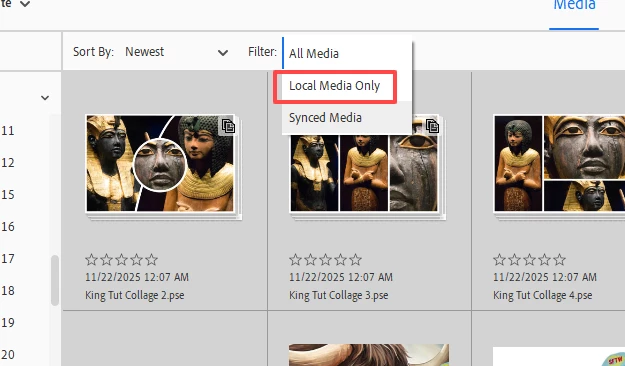
You can use the Filter to show only Local Media.


6382025.11.29.png


If you don't want any more files to upload to the Cloud, turn off the options in Edit>Preferences>Auto sync.

1 reply

Greg_S.
Community Expert
Greg_S.Community ExpertCorrect answer
Community Expert
November 29, 2025

You can use the Filter to show only Local Media.


6382025.11.29.png


If you don't want any more files to upload to the Cloud, turn off the options in Edit>Preferences>Auto sync.

Dick WAuthor
Inspiring
November 29, 2025

Thanks! Right in front of my face. Sigh. It's probably been there for a long time but I've only had images in Adobe Cloud recently, so never had occasion to even notice this.