Participant
March 10, 2019
Answered

Organizer question on sorts

  • March 10, 2019
  • 5 replies
  • 810 views

I am a newbie to organizer.  I am out of sorts.  I have sorted my media by oldest to newest.  Gone to an Event sort and all the photos are now in newest to oldest.  If I Want to do a chronological slideshow for instance of a specific event won't it be in the wrong order?  An example may be:  Any help will pleh?  Thanks.

Tim

    This topic is closed to new replies. Start a new post to keep the conversation going.
    Correct answer Greg_S.

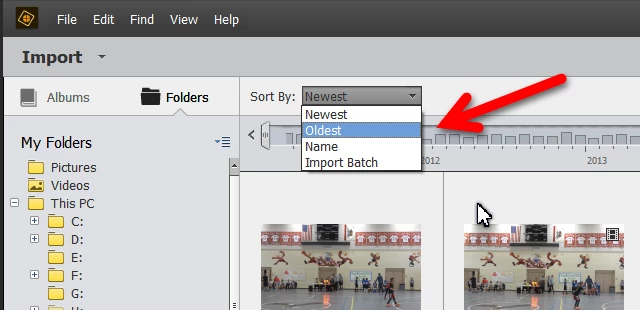
    OK, so in addition to the sort within day, you also need to sort the main grid by "oldest" in the "sort by" drop down menu at the top of the grid.  This should do what you want.
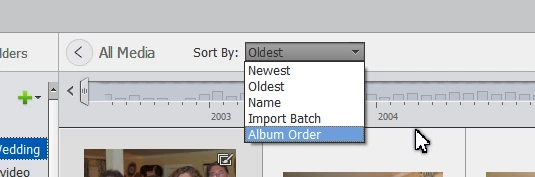
    There are some other organizational things you could do to break up your photos into projects.  One would be to create Albums for each slideshow in the Organizer.  In Albums, you can click and drag the images into whatever order you want.  However, in order for this to work, you have to first select an album and then change the sort by order at the top of the grid to (you guessed it ) "Album Order".

    As for working with other programs, I believe my experience has been mixed in terms of whether and how they accept images from the Organizer (by click and drag) in the Organizer's selected sort order.

    If you are looking for a new slideshow program, I recommend Elements 2019 which is different than Elements 14 and has a really nice and simple slideshow feature.  You can try it for a 30 day trial to see if you like it.

    5 replies

    Greg_S.
    Community Expert
    Community Expert
    March 13, 2019

    Hope all goes well with your family.  Come back whenever you're ready if you need further help.

    Greg_S.
    Community Expert
    Greg_S.Community ExpertCorrect answer
    Community Expert
    March 11, 2019

    OK, so in addition to the sort within day, you also need to sort the main grid by "oldest" in the "sort by" drop down menu at the top of the grid.  This should do what you want.

    There are some other organizational things you could do to break up your photos into projects.  One would be to create Albums for each slideshow in the Organizer.  In Albums, you can click and drag the images into whatever order you want.  However, in order for this to work, you have to first select an album and then change the sort by order at the top of the grid to (you guessed it ) "Album Order".

    As for working with other programs, I believe my experience has been mixed in terms of whether and how they accept images from the Organizer (by click and drag) in the Organizer's selected sort order.

    If you are looking for a new slideshow program, I recommend Elements 2019 which is different than Elements 14 and has a really nice and simple slideshow feature.  You can try it for a 30 day trial to see if you like it.

    Greg_S.
    Community Expert
    Community Expert
    March 10, 2019

    I hope this is sort of the answer you're looking for. 

    In Preferences, you can choose between Show Oldest or Newest within Each Day:

    If this doesn't answer your question, please give some more details about the workflow that gives you the wrong order.

    FogNorthAuthor
    Participant
    March 11, 2019

    Greg, Thanks for the reply.  You asked for it friend. More detail.  Elements 14.  Old photographer.  Since digital I have had 2 cameras and my phone. About 8500 images all taken over a 10 year period.  Most document a house build, many out buildings built, in a forest, many wild creatures, flowers, seasons, snow, etc, etc etc.  In the past I have created many slideshows of my travels...but...using slides.  Nothing major in digital.  I have a favorite slideshow producer that I use and planned? to use.  Therefore, images must come out of organizer in .jpg format, sorted oldest to newest,  into computer files usable by the slideshow software.  All the images will not be used but all are currently imported into Organizer.  More than likely I will break slideshows up into projects, subject matter, etc into perhaps 6-8 depending on number of images. So there might be for example, house construction images covering multiple days over a 9 month period. Oldest to newest.  Probably the biggest show.  Since my Organizer knowledge is minimal my hope(maybe pipe dream) is to work the process correctly the first time to eliminate false starts and time consuming redo's.  Would like to plow the field once...ha ha ha.

    So don't know if the day sort would work...maybe experiment.  Don't have a clue about possibility of working into another program after sorts??  Thanks for even reading this. \Tim

    FogNorthAuthor
    Participant
    March 13, 2019

    Greg,

    Family Medical problem calls me away.  Don't know when I will be able to get back to my project...so in the mean time things will be in total limbo...not knowing if your help has solved my problem.   I will use "correct answer" to sort of "close" the issue for now and will not really know to much later in time.  Have a super day !!!