Inspiring
July 8, 2022
Answered

Organizer seems to be stuck on Import screen

  • July 8, 2022
  • 3 replies
  • 309 views

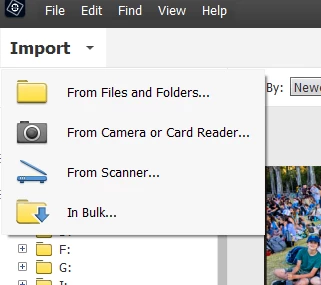
I'm using PSE Organizer 2018 (version 16) with Win 10.   Instead of opening with a grid of my photos, it opens at an Import screen and I can't seem to find a way to dismiss that  and go to the photos already in the organizer.       Could someone please tell me how to escape if I don't want to import anything new?

Thanks so much!

This topic has been closed for replies.
Correct answer Greg_S.

A picture (screenshot) would be worth a thousand words.   I have never seen the problem you are describing. If you click on the Import dropdown, clicking anywhere else on the screen should close it.


Do you have taskbar settings set to autohide.  Depending on your monitor size, this can cause an issue with menu operation.  If so, turn autohide taskbar off.


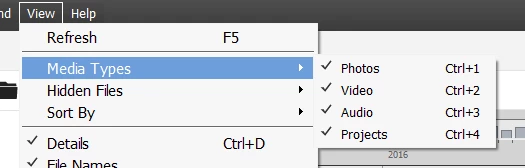
The only other possibility I can think of is that you have filtered out the media from your catalog. Go to the View>Media Types menu and make sure that all of the options are checked.  (Or press Ctrl+1 etc. to toggle the media on or off.)


If none of these suggestions work, please post a screenshot of what you are seeing.


3 replies

Greg_S.
Community Expert
Community Expert
July 9, 2022

@imaquila can you let us know which of the solutions worked for you.  It may help others who run into the same problem.  Thanks.

Greg_S.
Community Expert
Greg_S.Community ExpertCorrect answer
Community Expert
July 9, 2022

A picture (screenshot) would be worth a thousand words.   I have never seen the problem you are describing. If you click on the Import dropdown, clicking anywhere else on the screen should close it.


Do you have taskbar settings set to autohide.  Depending on your monitor size, this can cause an issue with menu operation.  If so, turn autohide taskbar off.


The only other possibility I can think of is that you have filtered out the media from your catalog. Go to the View>Media Types menu and make sure that all of the options are checked.  (Or press Ctrl+1 etc. to toggle the media on or off.)


If none of these suggestions work, please post a screenshot of what you are seeing.


imaquilaAuthor
Inspiring
July 9, 2022

Thank you so much for taking the time to reply!

imaquilaAuthor
Inspiring
July 8, 2022

Perhaps I should explain what I can see.  Top left corner is Import with a drop down list (but exit Import is not an option on that list), in the top middle of the window is eLive, Media, People, Places, Events and top right is Create and Share with their respective drop down lists.   Above all that is the usual File, Edit Find View and Help menus but again, there is no "take me back to the photos already in the organizer".    I can change catalogs but it just offers a differe  nt selection of images to Import.      I hope this description helps someone to identify a solution.   I'd really like to be able to access the photos already in there.