
Participating Frequently
February 27, 2024
Answered

Organizer with Photoshop Elements 2024 trial

  • February 27, 2024
  • 3 replies
  • 836 views

Hoping some knowledgeable soul can cast some light on my difficulty...


As I am considering FINALLY updating my Elements 14 software, I am trying out the Photoshop Elements 2024 trial version. I also have access to the Elements Organizer but once Organizer is loaded, I find clicking on any menu item or specific button does nothing. Two questions:


1.  Is Organizer supposed to be functional with an Elements Trial install?

2.  If yes: any suggestions on how I can enable this functionality?


Thanks all!
This topic has been closed for replies.
Correct answer Greg_S.

Yes, the trial version is fully functional and the Organizer should work.  When you first launched it, did you confirm the option to convert your catalog to the Elements 2024 version?  (Don't worry if you did, a copy of your original catalog will be saved and available for use with Elements 14.)  How large is your catalog, and did you see a message that the conversion had been completed?


If you did convert the catalog, then it is possible that media analysis is taking place in the background and this can impede the functionality of the program until the analysis is completed. 


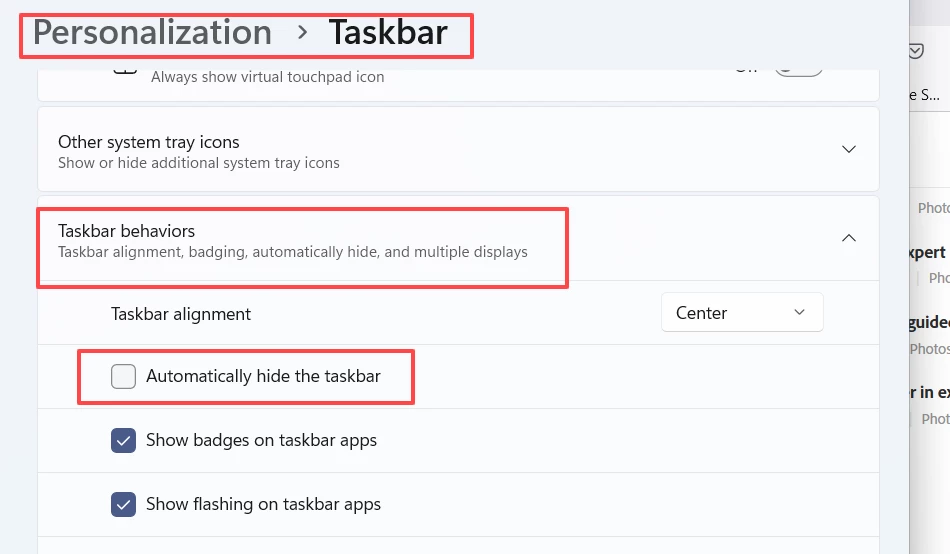
Another possibility includes that you have Windows taskbar set to autohide.  This can sometimes prevent menus from opening.  If this is the case, turn off autohide.  (Go to Windows Settings>Personalization>>Taskbar>Taskbar behaviors.)


3 replies

Dhananjayy
Adobe Employee
Adobe Employee
March 1, 2024

Hello Alwyns5027439,


I'm Dhananjay from Adobe Technical Support.


It appears that you're encountering difficulties with Adobe Elements Organizer, specifically being unable to click on menu buttons.


To address this, please follow these steps:


1. Disable AutoHide taskbar in Windows 10/Windows 11.
2. Open Elements Organizer.
3. Double-click on the center top of the menu bar where there are no buttons. This action will switch the UI of Elements Organizer from Maximize to Restore.
4. Once completed, try relaunching Elements Organizer.


I hope this resolves your issue.


Best regards,
Dhananjay

Participating Frequently
March 1, 2024

Thanks. @Greg_S.  already provided that answer and I marked that as the solution to my issue a few days ago.

Greg_S.
Community Expert
Greg_S.Community ExpertCorrect answer
Community Expert
February 27, 2024

Yes, the trial version is fully functional and the Organizer should work.  When you first launched it, did you confirm the option to convert your catalog to the Elements 2024 version?  (Don't worry if you did, a copy of your original catalog will be saved and available for use with Elements 14.)  How large is your catalog, and did you see a message that the conversion had been completed?


If you did convert the catalog, then it is possible that media analysis is taking place in the background and this can impede the functionality of the program until the analysis is completed. 


Another possibility includes that you have Windows taskbar set to autohide.  This can sometimes prevent menus from opening.  If this is the case, turn off autohide.  (Go to Windows Settings>Personalization>>Taskbar>Taskbar behaviors.)


Participating Frequently
February 27, 2024

Thanks you very much for this: it would appear that is the issue. I must admit that I am rather perplexed - and disappointed - that something that probably the majority of Windows users have active silently derails the programme.

Participating Frequently
February 27, 2024

And just to add: when I go to my account, the trial does not show up under my products. Also, when I enter into support chat, it says that I do not currently have any active trials. This in spite of the fact that I received the triap confirmation email to my regitstered email address and the trial versions of both Elements and ACR seem to be fully functional, as far as I can tell.

John Waller
Community Expert
Community Expert
February 27, 2024

Trials are never listed on the products page.


Only paid-for products (and their serial numbers) and active plan subscriptions.

Participating Frequently
February 27, 2024

Thanks: that makes sense. What I did find odd is that the Support bot said I did not have an active trial. Not sure what that is all about.