
Participant
September 18, 2025
Question

P: Photoshop Elements on MacOS 26 Tahoe does not launch

  • September 18, 2025
  • 8 replies
  • 3594 views

Ich habe auf meinem MacBook Pro M3 Max bisher adobe Photoshop Elements Editor am Laufen gehabt.

Nun kam das UpDate von Apple auf MacOs 26 Tahoe...und nix geht mehr!!

Ich bekomme folgende Fehlermeldung:
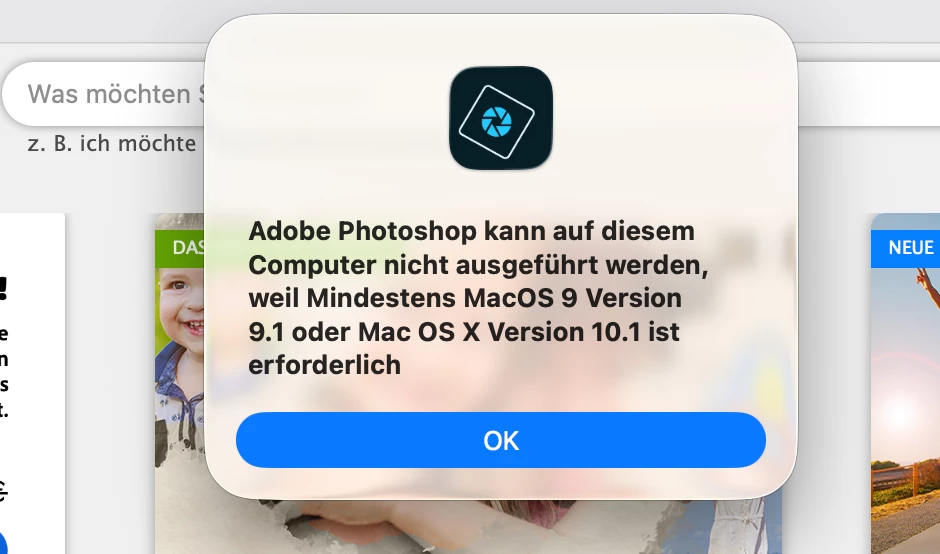
 

[Mod: Moved to the Photoshop Elements forum]


8 replies

ines777
Inspiring
September 24, 2025

Ich habe dasselbe gehabt.  Musste Photoshop Elements 2025 kaifen.  Jetzt geht es, aber PE ist jetzt nur 3 Jahre Subscription.  Man kann einen einzelnen product nicht mehr kaufen.

Participant
September 24, 2025

Gleiche Fehlermeldung bei mir mit Elements Version 2022. Wir erfüllen mit der aktuellen MacOS Version die Mindesanforderungen der Fehlermeldung. Also ist es gesetzlich verpflichtend für Adobe das Problem zu beheben, ansonsten sollten wir alle eine Rückerstattung anfordern. Vielleicht bewirken mehrere tausend Anfragen ja etwas. Und man sollte dieses Problem auch bei Apple melden, dann kommt evtl. auch Druck für Adobe von anderer Seite.


Participant
September 23, 2025

I just updated my Mac mini to Tahoe 26.0 and my Ps will not load.

Legend
September 23, 2025

Is that Photoshop Elements? You may need to upgrade to the current version of PSE.

Participant
September 30, 2025


uweh73374318
Known Participant
September 23, 2025

It took me some time to get PSE 2020 installed on macOS Tahoe: cleaning with the downloaded Creative Cloud Clean up tool after migration and then only a new download of the dmg package from my product page in my Adobe Account worked. Then Organizer started as expected, but when choosing the Editor an error message comes up immediately, stating that at least macOS X is required. Obviously Tahoe macOS 26 is fitting to that requirement. I hope PSE is not just looking for a macOS pre-number 10???


I hope someone can help please?


Uwe

Ged_Traynor
Community Expert
Community Expert
September 23, 2025

@uweh73374318 you'd be better off reporting the issue on the Photoshop Elements forum

Participant
September 19, 2025

Servus, habe das gleiche problem. habe die 22er Version. Ist schon irgendwie seltsam. Da weiss Adobe, dass ein neues OS kommt, aber nix passiert. Wenn das nicht in einer Woche geht, werde ich mein Geld zurück verlangen, notfalls mit meiner Rechtsschutzversicherung. Verarschen kann ich mich auch alleine. Traurig sowas

Glenn 8675309
Legend
September 19, 2025

Zero chance of an update.   Zero chance of a refund.  Adobe's policies on refunds is extremly well documented, always has been.   

You have at the most 30 days to obtain a refund, not three years.   Honestly: You're wasting your time and resources in seeking a refund. 

Check that your app is eligible for return

Any non-subscription app purchased directly from Adobe may be returned within 30 days of receipt. 

The following apps are not eligible for return:

  • Any Adobe app purchased from any seller other than Adobe may be returned only to the seller, in accordance with that seller's return policy, if any.
  • Apps obtained through an employee purchase program.
  • Not-for-resale (NFR), pirated, OEM-bundled, trial, or free-of-charge apps.
  • Fonts purchased through Adobe Fonts Marketplace.
  • Apps purchased from individuals, resellers, or online auction sites (such as eBay or Amazon Marketplace).
  • Apps, or versions of apps, that Adobe no longer distributes or supports.
 

Request a return

Depending on where you purchased the app, there are different ways to request a return of your non-subscription app. 

From Adobe
From a store
As a volume license
 

Adobe accepts returns within 30 days of receipt. It usually takes 2-3 days after you have placed an order for it to be eligible for return.

Return apps with a perpetual license

  1. Deactivate the app.

  2. Uninstall the app.

  3. Reach out to our support team and request a return. 

Note

If you purchased directly from Adobe using a bank transfer, you'll have to provide bank details to complete your refund request.

Return apps with a term license

You can also return apps with a term license, such as Acrobat, Premiere Elements, and Photoshop Elements. Follow these steps to request a return: 

  1. Deactivate the app by signing out.

  2. Uninstall the app.

  3. Reach out to our support team and request a return. 

Understand refund timelines

Adobe processes refunds within 5–7 business days. However, the funds could take longer to show on your account, depending on the payment method used.

A confirmation email is sent when the refund is complete. If you have online access to your credit account, your refund could appear earlier than on a paper statement.

Any Adobe app purchased from any seller other than Adobe may only be returned to the seller from which the app was purchased, in accordance with that seller's return policy, if any.


Your version hasn't been supported for 3  year now.  Adobe only officially supports the most current version and the previous version, that's it.  What that means: PSE 2023 and all versions before it are unspported, and PSE 2024 will join that group when pse 2026 gets released.


Participant
September 19, 2025

ok, dann kaufe ich halt von dem Laden nix mehr, gibt ja genug Alternativen.

Participant
September 19, 2025
will not load
Ged_Traynor
Community Expert
Community Expert
September 19, 2025

@default4600377748dimr you'd be better off reporting your issue on the Photoshop Elements forum, also you really need to provide more detailed information in order for someone to be able to help you

Participant
September 19, 2025

Hallo. Ich hab Photohop Elements 2022. Das funktioniert auch nicht mehr.  gekauft sogar erst im Oktober 2022. DH ich habe es noch keine 2 Jahre nutzen können. Hoffe es gibt ein Update. Sonst werde ich bei Adobe nichts mehr kaufen. 

Participant
November 11, 2025

Mir geht es genau so. Wenn es keine kostenlose Updates mehr gibt, werde ich auf eine ander Software umsteigen.


Sameer K
Community Manager
Community Manager
September 18, 2025

Hey, @casual_Companion0D4B. Welcome to the Photoshop Elements Community. I'll clarify this for you. 


I've checked your account, and you're using an older version of Photoshop Elements. 


MacOS Tahoe is very recent, and the older versions of Photoshop Elements may not be compatible. If you're on a newer version of Photoshop Elements, you can wait for compatibility to arrive via an update.


Thanks!
Sameer K
(Type '@' and type my name to mention me when you reply)

Participant
September 18, 2025

@Sameer K 


Since Monday I was using Adobe Photoshop Elements 2021.

I think, this is not so old.... do u agree?

So as an user, who has already paid for this: when will there be an upate, so I can use my software under Tahoe??


Participant
September 18, 2025

Sorry for my english...

Until monday....