randyl87109939
Participant
April 9, 2024
Answered

PE 2024 EDITOR Wont open

  • April 9, 2024
  • 36 replies
  • 39667 views

Have been using PE 2024 for months. Today Editor won't open. ERROR : APP linked to Ipp Libraries.  Ver 2021.6  No DLL from list found.  ippcve9.dll (most suitable) Its been fine. What happened overnight and how to fix it?

Correct answer Greg_S.

@AnnieBleu15 thanks for confirming that the Elements 2024.3 update is now working for you.  I have also confirmed that my Windows machine has been updated.  To determine what version you have, go to Help>About Photoshop Elements.  The new update will show the following splash screen:
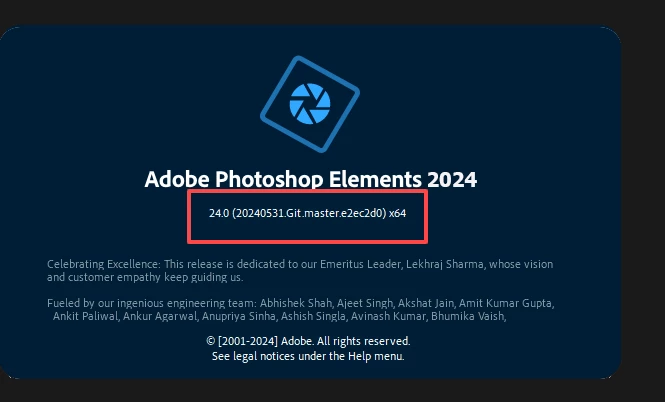


If you have turned Automatic Updates off in Preferences, you should receive a notification that an update is available.  Otherwise, turn automatic updates back on again.  It may take a little while for the update to show up on your machine.


@Philippe37799642pntu, yes this update is designed to fix the problem you describe.



36 replies

Participant
October 10, 2025

I have the same problem with PSE 2025 on Windows 11. I found a workaround ("bandaid" at best - not a solution): double-clicking on an existing PSD file successfully opens the editor. While that is open, right-click on the icon on the tool bar and select "Pin to Tool Bar", providing a simple way to open the editor directly and not require going through the PSE menu panel.

Participant
February 7, 2025

I know this answer is pretty late, but after going through everyone's answers which did not help me, I figured I'd add something which didn't fix it entirely, but I did get it to work. 


Let me start by saying, my computer is more than capable.  I am running Windows 10 with the latest updates, and all my drivers are up to date as well.  I have 32 gig of RAM,  and an Asus GeForce RTX 2070 Super Video card


First, I never get an error, I just click on the program;  it looks like it's loading, but then nothing happens.  So I just opened the Task Manager by right clicking on the Taskbar at the bottom of the screen (explanation for those who don't know), choose Task Manager.  Under Background Processes it should display 1-2 processes of Adobe Photoshop Elements 2024.  I clicked on both and hit End Task.  Now when I try to open the program, it opens no problem.  The only downfall is that you have to do this pretty much every time, but hey, at least it opens. 


I've owned this program for almost a year, and this just started about 1 month ago, so I'm guessing it most likely was caused by an update.  Anyways, I hope this message helps someone out there who is still looking for a solution.

Participant
January 10, 2025

I have a mac running os 15.3 and PE 2024

wont open and come back with error message error 11.


Id like some¬one one from Adobe to explain what is needed to be done to rectify this with as i dont have the original install files.

Participant
January 4, 2025

1

Participant
July 15, 2024

Hi


A simpler solution is to install the demo version,after starting the program choose that you have a serial number,after entering it it works fine,i tried on two computers

Greg_S.
Community Expert
Greg_S.Community ExpertCorrect answer
Community Expert
June 21, 2024

@AnnieBleu15 thanks for confirming that the Elements 2024.3 update is now working for you.  I have also confirmed that my Windows machine has been updated.  To determine what version you have, go to Help>About Photoshop Elements.  The new update will show the following splash screen:


If you have turned Automatic Updates off in Preferences, you should receive a notification that an update is available.  Otherwise, turn automatic updates back on again.  It may take a little while for the update to show up on your machine.


@Philippe37799642pntu, yes this update is designed to fix the problem you describe.


Participant
June 29, 2024

Adobe Photshop Elements kann ich jetzt updaten, aber Premiere Elements 2024 lässt sich nicht updaten. Ich kann auch  nicht mehr wie früher auf "später installieren klicken". Es erscheint nur folgende Seite:

Ich kann Premiere Elements 2024 also gar nicht nutzen seit April 2024.

Wer kann da helfen?


AI can Adobe Photshop element element now updating but premiere not updating lets itself 2024. I cannot any more either as early on " later install click ". The following page only appears:

I can premiere element so 2024 hasn't used since April 2024. at all

Who can help there?

Participant
June 29, 2024

I further don't come any more. Premiere was very good going on element until April.

Weiter komme ich nicht mehr. Bis April lief Premiere Elements sehr gut.

Greg_S.
Community Expert
Community Expert
June 21, 2024

The Photoshop Elements update page indicates that an update has now been released for Windows users.  I have just checked my installation and I haven't received it, even though I have automatic updates turned on.  There may be some typographical errors in the update page, or possibly the Help>About Photoshop Elements splash screen has not been modified (unlikely).


For those of you who have experienced the  ippCV Library error, can you please check to see if your machine has been updated (or if there is an update available if you have automatic updates turned off).


And for those of you who have received the new 2024.3 update, can you please confirm whether or not it works on your machine. 

Participant
June 21, 2024

Thank you.
Does this update correct the installation error that causes the message :


‘No DLL from the list below is found on the system search path:
ippcvy8.dll (the most suitable for your CPU)
ippcvn8.dll (optional)
ippcvm7.dll (optional)
Please provide a path to at least one of them’


when you want to launch Photoshop Editor ?


Greg_S.
Community Expert
Community Expert
June 21, 2024

@Mark38072693gxjl, if and when a curative update is released, I will make sure that the information is posted in this and other discussions involving this problem.  A week or two ago, Adobe posted an update for Mac machines that affected a large number of users.  I have asked Adobe to confirm whether or not there will be an update for Windows to resolve this issue.  I will keep users informed as best I can.  Unless you turned forum notifications off, you should receive any new posts in this thread automatically.

Participant
June 14, 2024

I had the same issue. I couldnt even get into photo editor to go to the help screen to sign out! The answer is that there is a corrupt file in the software. You need to call Adobe and if possible allow them to take control of your account remotely and they will replace the damaged file. That is what I did and it works fine now. I have no idea why they can't just release a patch!! I hope this helps.

Greg_S.
Community Expert
Community Expert
June 14, 2024

@LB37380, what do you mean when you say you don't have the activation code for that download?  Are you unable to download the software from the link provided by @Harry36641672it5z ?  I just tried it and no activation code was required.  If you are a registered user of Elements 2024 and have been able to successfully install the prior version of Elements 2024, from the link, then you are probably being asked to enter your registered serial number.  If this is not the problem, show us any error message you are receiving BUT don't include any of your personal information.