

PE2018 Color Problem
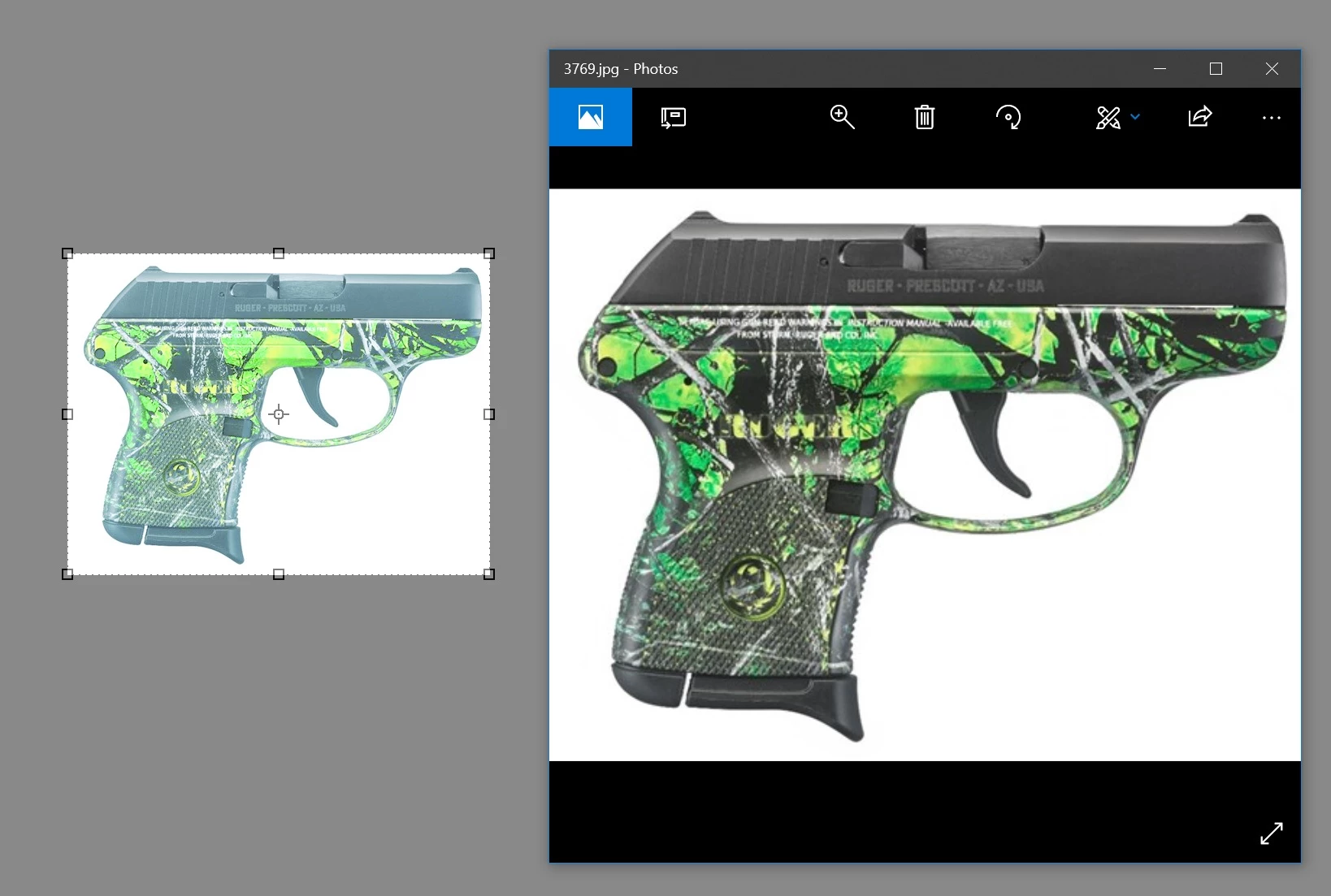
Apologize in advance if this has been answered, but I have searched and could not come up with a solution that met my problem. Was having this issue with PE 13 and just upgraded to PE 2018 with same persistent issue. The issue did go away for awhile but has come back and I cannot figure out how to resolve as I did not change any settings between working correctly and not. When I open a file (could be a PDF I created or a JPG, PNG, etc.) the image is displayed washed out and desaturated. I am including a pic that better shows the issue. The image on left is open in PE 2018 and the image on right is what it should look like. I have left all settings at default but here is what I know:
- Color mode is sRGB (switching to Adobe RGB does nothing)
- Color settings are set to optimize for computer screen
- Windows 10 with all latest updates applied 64-bit
Also, if I change the color settings to "No Color Management" it gets me closer to what I expect to see but is still not where it should be. This leads me to believe there is something there, but I don't know how to resolve or where to go to change the appropriate setting. Sorry for the confusion but I am new to this.
Am looking for help trying to get image to display properly so I can edit. Used this image as an example to show color differences.
ThanksSteve
 AdChoices