Did you save the slideshow (not just the mp4 file)? If so, open the slideshow by double-clicking it in the Organizer.
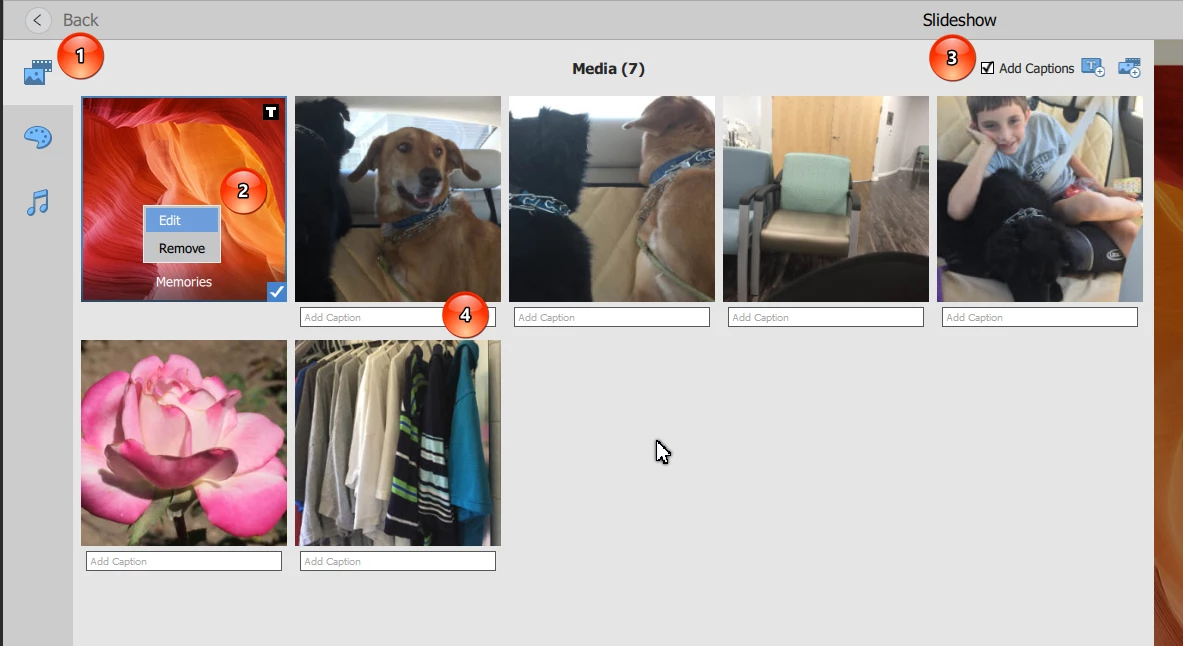
1. Click on the Media tab at the top left of the Slideshow Editor. You should see something like my screenshot.
2. If you are referring to the Title slides, you can right click on the erroneous one and edit it.
3. If you are talking about true captions, make sure the Captions box is checked.
4. You should be able to edit the caption by clicking on it. This will open the text entry box for editing.
Once you have completed your edits, click on the media tab icon again and it will take you back to a preview of your edited slideshow.
I hope this answers your questions.
Added: Just to be clear, you cannot edit the mp4 file to change the text.

 AdChoices