

trwalp
Known Participant
June 8, 2020
Answered

PE2020 watch folder does not accept mapped network drive letter. Any solutions?

  • June 8, 2020
  • 1 reply
  • 947 views

This forum post would appear to cover my question but the answer involves entering a UNC path for the watch folder.
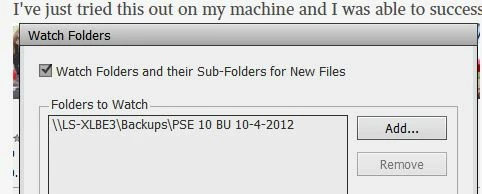


Yet the dialog box in my new PE2020 does not allow manual entry of a UNC path; just selection from the typical drive/folder tree.
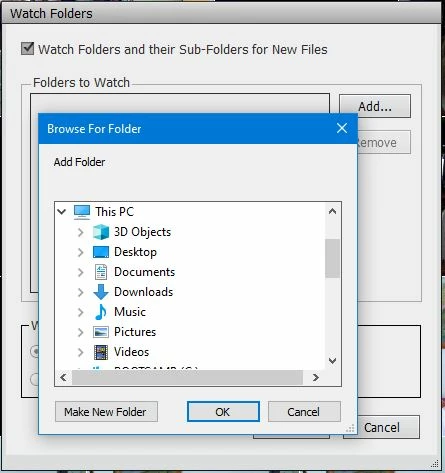


Am I overlooking something?


Also, just to confirm, am I correct in understanding that it is not possible to have PE2020 scan the  folder containing all my photos and update the catalog with any changes it finds?  I'm new to PE and am trying to adjust. I presume that's the reason for the Watch folder, so that changes will be picked up that way.

This topic has been closed for replies.
Correct answer Greg_S.

I assume you are refering to this thread as your follow up post? (Your link leads back here.)  I have responded there.

1 reply

Greg_S.
Community Expert
Community Expert
June 8, 2020

Were you unable to see the drive on your Network via the navigation dialog?


trwalp said:

Also, just to confirm, am I correct in understanding that it is not possible to have PE2020 scan the folder containing all my photos and update the catalog with any changes it finds?

You can Import>In Bulk and direct the import dialog to the folder containing your photos.  Upon completion, only found files that are not already in your catalog will be imported.

trwalp
trwalpAuthor
Known Participant
June 9, 2020

Thank you for replying, @Greg_S.  I eventually figured out that my NAS needed a settings change for it to show up in the Windows 10 File Explorer > Network (mapping it to a driver letter was not enough). Once it started appearing there I was able to select it from the tree and add it as a Watch Folder. Now PE2020 automatically adds pictures added to the watched folder on the NAS.  Yeah! 


Double-thank-you for answering my other question:


You can Import>In Bulk and direct the import dialog to the folder containing your photos.  Upon completion, only found files that are not already in your catalog will be imported.


That is a useful insight.  But it raises the question: what criteria is used to import or skip?  In any photo library there are a number of duplicate filenames (e.g., img_0050.jpg), distinguished only by the folder path they're in, file timestamp, and EXIF metadata if it exists. So how does PE2020 bulk import decide?    Greg_S., if you happen to see this reply please look at my follow-up post. I will greatly appreciate your expertise there.

Greg_S.
Community Expert
Greg_S.Community ExpertCorrect answer
Community Expert
June 9, 2020

I assume you are refering to this thread as your follow up post? (Your link leads back here.)  I have responded there.