This topic is closed to new replies. Start a new post to keep the conversation going.
hatstead
hatsteadCorrect answer
Inspiring
Feb 6, 2023 12:15 PM UTC

It's not available in my version of PSE either.

Download Irfanview (free), a very popular viewer. IrfanView - Official Homepage - One of the Most Popular Viewers Worldwide

Open your picture file in Irfanview and resave in .pdf file format.

6 replies

Jeff Arola
Community Expert
Community Expert
Feb 6, 2023 11:36 PM UTC

We've seen this posted about before

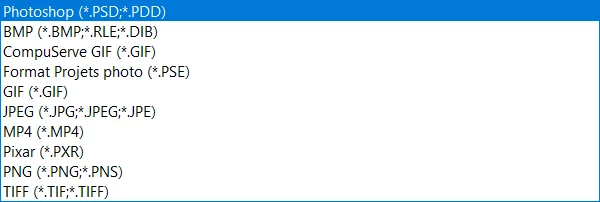
In the other posts that the ops provided screenshots they also had MP4 listed as a Save As option in the File Formats list.


What happens if you chose MP4 and click Save?


Translate
Participant
Feb 7, 2023 7:55 AM UTC

It creates a mp4 file. I've tried to rename it in .pdf but the file is not valid doing so

Translate
MichelBParis
Legend
Feb 6, 2023 1:34 PM UTC

The "Photoshop pdf" format is still available in my PSE2022 and PSE2023 versions on Windows 10. I have no idea why you don't have it.

On the other hand, the "Photoshop pdf" format is a different flavour of the usual pdf format for Acrobat, Illustrator etc. It's a combination of a true psd and a true pdf format to insure compatibility when saving. That way, you can save losslessly because the psd version still contains all its layers, even text and vector ones. That's at the cost of much bigger file sizes obviously.

You should not need to use another file editor because your best option is not to SAVE as pdf, it's to PRINT your file using a virtual pdf printer such as the free Microsoft pdf printer "print to pdf" bundled with your OS. That's because pdf is a prining/displaying format, not a photo format. Using "print to pdf" or any other free virtual printers gives true acrobat pdf format files, much smaller than Photoshop pdf ones. You can print a selection of pdf files which will be exported in multipage pdfs. The problem with the 'printed' pdf files is that they are no longer recognized by the organizer, contrary to the Photoshop pdf ones.


Translate
Participant
Feb 6, 2023 1:49 PM UTC

Thank you too for your response, MichelBParis

The "print to pdf" option is a smart workaround, I'll try it too.

I've check on another computer, and it's exactly the same problem in PSE22.
It should be good if Adobe could help users who haven't this option.


Translate
hatstead
hatsteadCorrect answer
Inspiring
Feb 6, 2023 12:15 PM UTC

It's not available in my version of PSE either.

Download Irfanview (free), a very popular viewer. IrfanView - Official Homepage - One of the Most Popular Viewers Worldwide

Open your picture file in Irfanview and resave in .pdf file format.

Translate
Participant
Feb 6, 2023 12:53 PM UTC

Thank you for your help 🙂 I'll try Irfanview

But this is as strange as annoying. Moreover, I've read that some people have the .pdf in PE22.
Is it a bug? A different version ?

Translate