
Participant
September 7, 2021
Question

Pen pressure brush?

  • September 7, 2021
  • 2 replies
  • 2527 views

I'm honestly getting quite upset about this. I'd imagine this would be an easy to find setting considering it's used for most digital art. But I could just be an idiot too. 


I need a pen pressure brush. Where the brush preview is a line with sharp edges and a thick middle. Something like this.
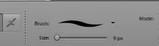
 

Can someone tell me how I go about getting this specific brush? Can't find it, and no tutorials on how to do it. I'm so confused. Thanks in advance.

This topic has been closed for replies.

2 replies

AJIIJA
Known Participant
November 22, 2022

It's Nov 2022...I just bought Elements 2023 and had to do two things to correct things and enable pressure brushes...it now works fine...if you are still having trouble, I can help. Let me know.

Jim

AJIIJA
Known Participant
November 22, 2022

This solution will also work in Photoshop (any version). I'm just trying to help others because Adobe is still oblivious to helping us in this matter.

Jim

Jeff Arola
Community Expert
Community Expert
September 7, 2021

You need to have a drawing tablet, like for example, a Wacom Intuos, in order to see the

pen pressure brush previews and then the brush draws thinner or thicker depending on

how much pressure you apply to the pen while drawing.


On macOS you'll see the Pen Pressure previews even if you don't have a pressure tablet.


Participant
September 8, 2021

Hi! I own a Gaomon! My problem is that I see this; 


It doesn't do pressure It's strange. 😞

Jeff Arola
Community Expert
Community Expert
September 8, 2021

Did you click on Tablet Setting to verify Size is checked?


What operating system and version of photoshop elements are you using?


Which model of Gaomon?