
Participant
March 2, 2024
Answered

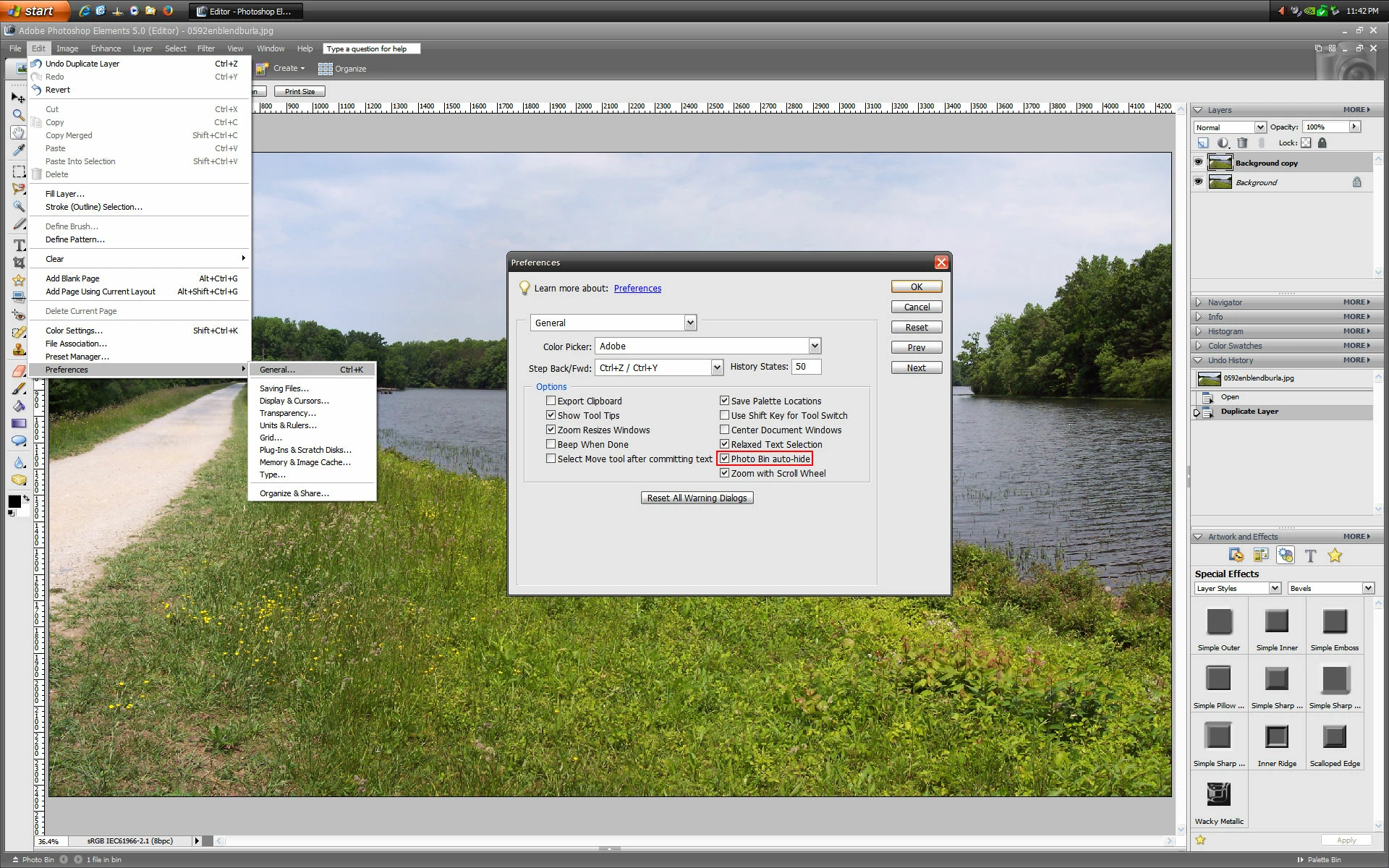
Photo bin wont stay open

  • March 2, 2024
  • 2 replies
  • 424 views

We have been using pse 5 for years on the windows 10. No problems.

It is not connected to the internet to prevent viruses.

Today the photo bin keeps closing!.

Repaired, no change.

Uninstalled and reinstalled from disc . No change!

Ideas anyone?

Thanks.
Correct answer Jeff Arola

If in the pse 5 Editor you go to Edit>Preferences>General do you have Photo Bin auto-hide checked?


2 replies

Jeff Arola
Community Expert
Jeff ArolaCommunity ExpertCorrect answer
Community Expert
March 3, 2024

If in the pse 5 Editor you go to Edit>Preferences>General do you have Photo Bin auto-hide checked?


Participant
March 3, 2024

JEFF, THANK YOU VERY MUCH!!!!

Glenn 8675309
Legend
March 3, 2024

Where I live I tend to get windows updates pushed out on saturdays- perhaps it's a windows update that caused this behavior.

If your computer is not connected to the internet you definately are missing out on system updates.  Not PSE, (your version stopped issuing updates about 16 years ago) but OS updates.

Your version is limited to using only 4 GB of ram- The program can only "see" the first 4GB of ram installed- even if you have more than that installed.   

You have not mentioned if you have manually installed any ad ons.  TRY THIS: PRESS AND HOLD your left shift key the click on the icon that starts the editor. 

ANOTHER THING TO CONSIDER:   You software was first released about 18 years ago. You are bound to have issues.

Here is a link to the free 30 day trial version of PSE 2024.    
https://www.adobe.com/products/photoshop-elements/try-elements.html?sdid=WB99JHFM&mv=search&mv2=paidsearch&utm_campaign=cv-nwmp-ae2024&utm_medium=cpc&utm_source=google&utm_content=AE2024&utm_term=ps%20elements&gad_source=1&gclid=CjwKCAiAuYuvBhApEiwAzq_YiSYi17MsxvMnBnLVnuIIkBRsEdANjsJCNtFZXrnsBACKZP6jmx08axoCAU0QAvD_BwE


Participant
March 3, 2024

Obviously a windows update can not have happened!

"You have not mentioned if you have manually installed any ad ons.  TRY THIS: PRESS AND HOLD your left shift key the click on the icon that starts the editor. "  there is no icon to start the editor. No add-ons.

Thanks for trying.

Glenn 8675309
Legend
March 3, 2024

So how do you start the editor?  You click on an icon, or the exe file.