Inspiring
April 10, 2025
Answered

Photo Elements 2022 issue with Sony A7IV smaller Raw ARW-M file openingg in editing with Camera Raw

  • April 10, 2025
  • 5 replies
  • 1027 views

I have Camera Raw 15.3.0.1451 as my current version. I used my camera recently on the APS-C settng with a amaller raw file and now my Photoshop Elements will not open the file says I need a updated version for my  camera.  Know I updated to the version listed above when Sony added this ARW-M file a few years ago and it worked then.  Any suggestions?

Correct answer Greg_S.

Are you saying that your camera has new firmware from Sony?  Before I posted my original response, I looked at the Sony site and couldn't find any update from Sony since 2020, I believe.  In any event, I have confirmed that Elements 2022 is able to handle your raw image with ACR 17.  So now, we have to help you install ACR 17.  I'm unclear as to what problems you are having.


If you go to the link posted by Glenn, you will find a download link for the latest ACR version:
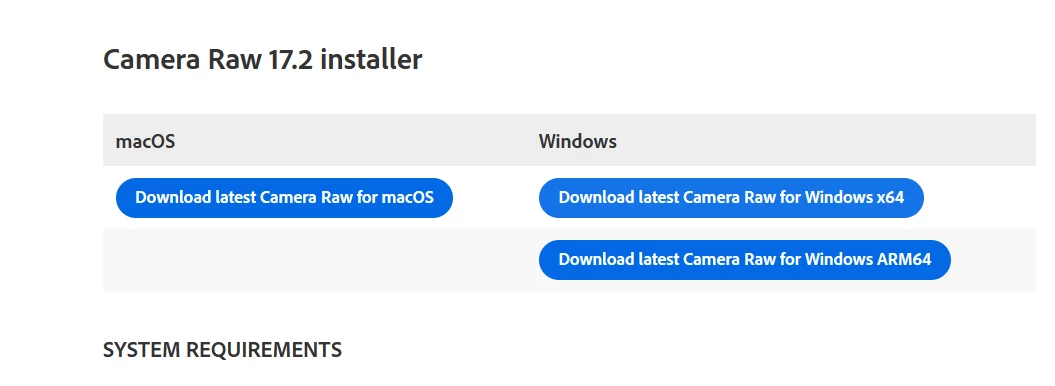
 

After you download the file, double-click on it and the latest ACR will be installed in C:\Program Files\Common Files\Adobe\Plug-Ins\CC\File Formats.  You need to copy the file named Camera Raw.8bi from that folder and paste it in the one used by Elements 2022, which is:

C:\Program Files\Common Files\Adobe\Plug-Ins\Elements 20\File Formats


However, before you paste the file into that folder, you should rename the file of the same name that already exists there.  It is generally best to rename the file with a tilde (~) at the beginning, so that it is renamed to something like ~Camera raw.8bi.old.



5 replies

Greg_S.
Community Expert
Community Expert
April 11, 2025

Sorry, I cross-posted with you.  Glad it is now working for you.

Inspiring
April 11, 2025

Thanks Greg as I will have to update my laptop as well -- using the desktop more and that is updated now.  I just did not want to forced to buying new editng software when I thought I was set with a camera that fills my needs changes file formats with a software update.  I am content with what I have -- not really into AI other than noise reduction. 

Greg_S.
Community Expert
Greg_S.Community ExpertCorrect answer
Community Expert
April 11, 2025

Are you saying that your camera has new firmware from Sony?  Before I posted my original response, I looked at the Sony site and couldn't find any update from Sony since 2020, I believe.  In any event, I have confirmed that Elements 2022 is able to handle your raw image with ACR 17.  So now, we have to help you install ACR 17.  I'm unclear as to what problems you are having.


If you go to the link posted by Glenn, you will find a download link for the latest ACR version:


After you download the file, double-click on it and the latest ACR will be installed in C:\Program Files\Common Files\Adobe\Plug-Ins\CC\File Formats.  You need to copy the file named Camera Raw.8bi from that folder and paste it in the one used by Elements 2022, which is:

C:\Program Files\Common Files\Adobe\Plug-Ins\Elements 20\File Formats


However, before you paste the file into that folder, you should rename the file of the same name that already exists there.  It is generally best to rename the file with a tilde (~) at the beginning, so that it is renamed to something like ~Camera raw.8bi.old.


Greg_S.
Community Expert
Community Expert
April 10, 2025

Barbara, I currently have ACR 17 installed in Elements 2022 and your raw file was imported properly into the Organizer and can be opened in the Editor.  You may want to use the link provided by Glenn to install the latest version of ACR.  Make sure you follow his instructions precisely.   When I have some time later, I will see whether there is any problem using an earlier version of ACR in Elements 2022 with your file.  That should not be the case.


One other possible issue:  Are you using the Elements Web?  Raw files are not supported there.

Inspiring
April 10, 2025

Yes I culd edit the file too from my reply above .  I will try upgrading to ACR 17-- fingers crossed.  May have been recent software update to camera.

Inspiring
April 10, 2025

I do not seem to be able to load find the new version of camera raw 17. in my downloads  Was able to reload my old one as had nothing for awhile

Greg_S.
Community Expert
Community Expert
April 10, 2025

Barbara, can you attach one of these .arw files here so we can check it out.  I'm not sure if this forum allows you to attach raw files.  If it doesn't, try zipping it and attaching the zipped file.

Inspiring
April 10, 2025

Let me know if the file is attached below-- could not get the zippered version to paste .  I could try private email if feasible.  thanks

Inspiring
April 10, 2025

Weird thing was I could download the file above and when I opened it , it showed up in the camera raw edit portion of my elemnts 2022 and when I edited it I could save it to same file location as the ones on my computer .Only the edited picture shows in the organzier section of the Elements program, no  oirignal raw file.

Glenn 8675309
Legend
April 10, 2025

Your camera only requires at least ACR 11.4.   

Delete the 8bi file, reinstall the acr file:

https://helpx.adobe.com/camera-raw/kb/camera-raw-plug-in-installer.html

14.5 should work.

Follow the on-screen instructions.

 Once installed successfully, close the installer window.

 Navigate to the following folder:

On macOS: /Library/Application Support/Adobe/Plug-ins/CC/File Formats

On Windows: C:\Program Files\Common Files\Adobe\Plug-Ins\CC\File Formats

Copy the Camera Raw plug-in (just the .8bi file) from the CC > File Formats folder that is mentioned in the above step.

Navigate to the following folder: 

On macOS: /Library/Application Support/Adobe/Plug-ins/Elements<Version Number>/File Formats


On Windows: C:\Program Files\Common Files\Adobe\Plug-Ins\Elements<Version Number>\File Formats


Replace the existing Camera Raw plugin in Elements<Version Number> folder with the plug-in that you copied earlier.


Inspiring
April 10, 2025

Believe that I updated from 14.5 to the 15.3 version when Sony did an update a few years ago and was able to use it on my old desktop with the 2022 Elements.   That same file worked fine with the 15.3 I recently changed over to a new desktop and set the 2022 version up with the newer Camera Raw I had.  It works fine for my regular full frame photos. So you think I shoud uninstall the 15.3 for the 14.5?