Answered
Photo Shop 2022 updated and I lost ALL of my photo captions
My Photo Shop Organizer 2022 recently updated on my computer resulting in ALL of my photo captions missing. Any suggestions on how to restore the captions?
Thank you.

My Photo Shop Organizer 2022 recently updated on my computer resulting in ALL of my photo captions missing. Any suggestions on how to restore the captions?
Thank you.
@lupson, I am confident that nothing has been lost.
When you installed Elements 2023, you probably didn't notice, or you failed to accept an option to convert your old catalog to the new Elements 2023 catalog. If that is what happened, a new Elements 2023 catalog would have been created.
You need to go to the File>Manage Catalogs dialog in Elements 2023. Click on the Convert button. This will open another dialog with a list of available catalogs to convert. If you have more than one, look at the dates of when the catalogs were last modified and also the number of media items in the catalog. This should give you a clue as to which catalog to choose. Select the catalog in the list and click the Convert button in that dialog.
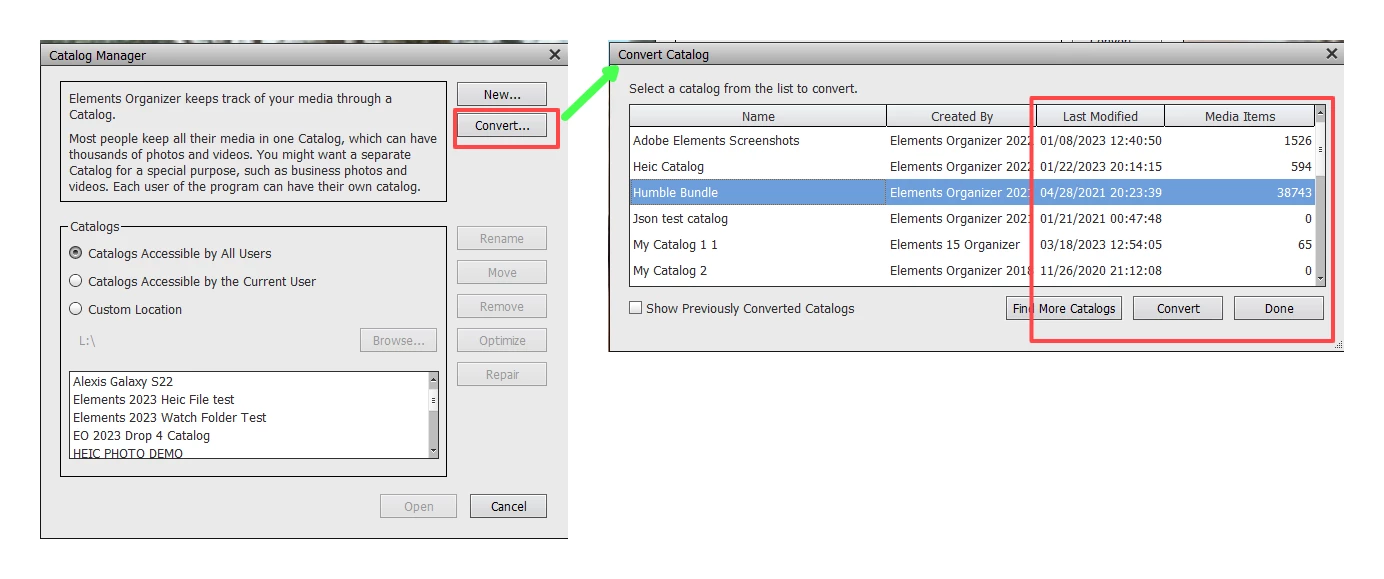
Some new message/status dialogs will pop up and you should wait until the process is completed. Depending on the size of your catalog, this may take several minutes. Click out of the new messages etc and the newly converted catalog will be available for you to open.
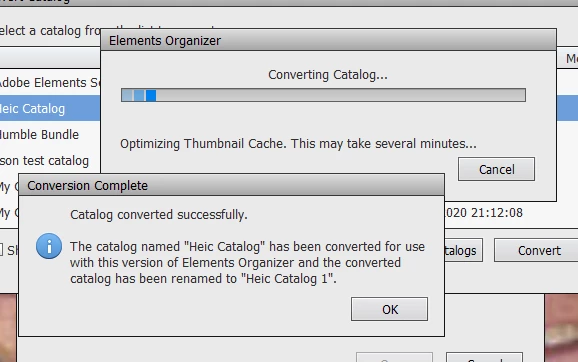
As you will see in one of the messages, your converted Elements 2022 catalog will be renamed with a -1 suffix. You will still be able to use this renamed catalog in Elements 2022.
Already have an account? Login
Enter your E-mail address. We'll send you an e-mail with instructions to reset your password.


 AdChoices