
Participant
November 16, 2016
Answered

Photomerge in Elements 15

  • November 16, 2016
  • 1 reply
  • 5590 views

I have just upgraded from Elements 14 to Elements 15.

I can not locate Photomerge or Panorama.  The tutorial indicated that in the Expert mode it is in the Enhance tab.

Photomerge does not appear in the Enhance tab in my version of Elements 15.

Can anybody tell me where it is located?
    This topic has been closed for replies.
    Correct answer 99jon

    In recent versions of PSE Photomerge was accessed from Enhance on the menu bar. In earlier versions it was found under:

    File >> New >> Photomerge

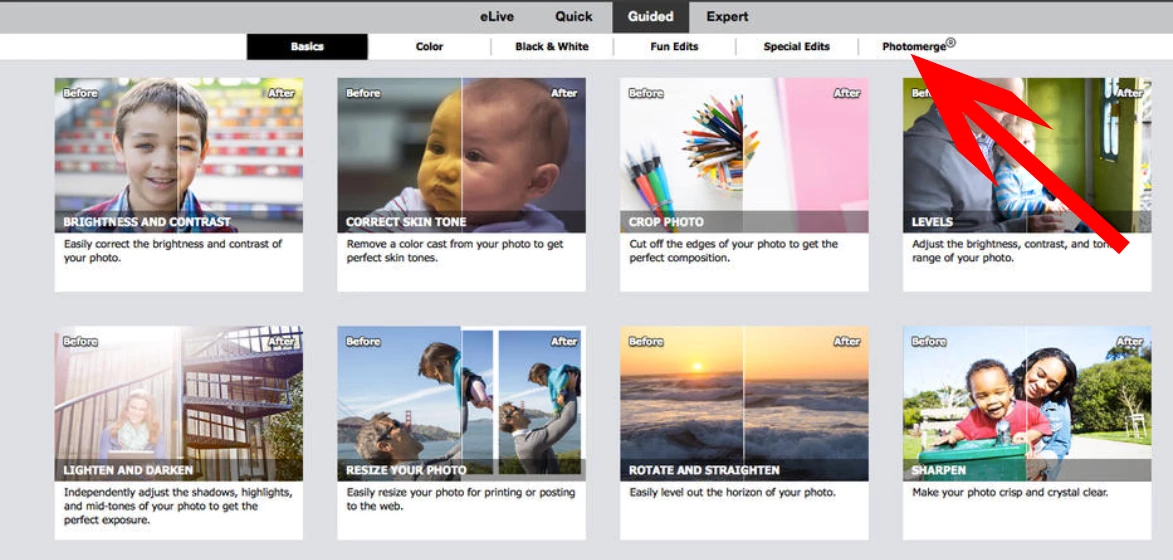
    In PSE14 & 15 it has its own tab in the “Guided” module – see image below:

    It is also possible to start by selecting thumbnails in the Organizer using Edit >> Photomerge

    1 reply

    99jon
    99jonCorrect answer
    Legend
    November 17, 2016

    In recent versions of PSE Photomerge was accessed from Enhance on the menu bar. In earlier versions it was found under:

    File >> New >> Photomerge

    In PSE14 & 15 it has its own tab in the “Guided” module – see image below:

    It is also possible to start by selecting thumbnails in the Organizer using Edit >> Photomerge

    Participant
    November 17, 2016

    To 99jon

    Thank you.

    Tom T