
Participant
March 3, 2025
Answered

photos don't automatically upload

  • March 3, 2025
  • 2 replies
  • 131 views

When friends e mail photos, I've always been able to save them in my PICTURES folder on my PC and the next time I would open Photoshop elements, those photos would appear on a screen and I could choose to add them to the Organizer or not. But somehow that process has stopped. Photoshop is no longer searching that folder. How do I fix this? 
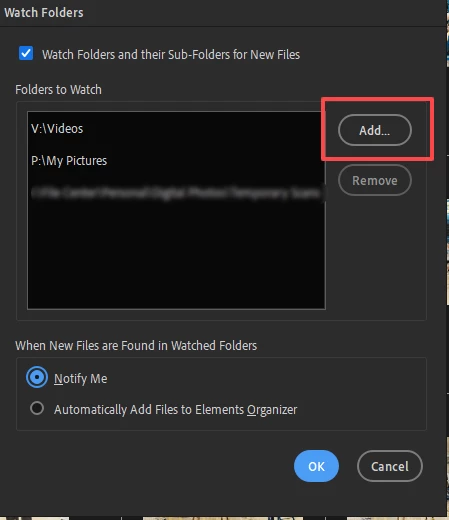
Correct answer Greg_S.

Go to File>Watch Folders in the Organizer and add the Pictures folder:


Sometimes, it can take a while for the new photos to appear in the import dialog.

2 replies

Greg_S.
Community Expert
Greg_S.Community ExpertCorrect answer
Community Expert
March 4, 2025

Go to File>Watch Folders in the Organizer and add the Pictures folder:


Sometimes, it can take a while for the new photos to appear in the import dialog.

Glenn 8675309
Legend
March 4, 2025

Alot depends upon your email client -- what software do you use to handle email?  I use office 365  (outlook) for example.