Answered
Photos I open in Photoshop are turning black and white. I would like to be able to insert coloured p
Photos I open in Photoshop are turning black and white. I would like to be able to insert coloured photos in my projects.

Photos I open in Photoshop are turning black and white. I would like to be able to insert coloured photos in my projects.
@Daniel23028816hqkt, I'm sorry but I'm having difficulty understanding what your problem is. I have asked you some questions and you have not answered all of them. So, if you did not understand my suggestion to reset the preferences, here is a screenshot of the menu item you need to select and the button you need to press when the dialog opens:
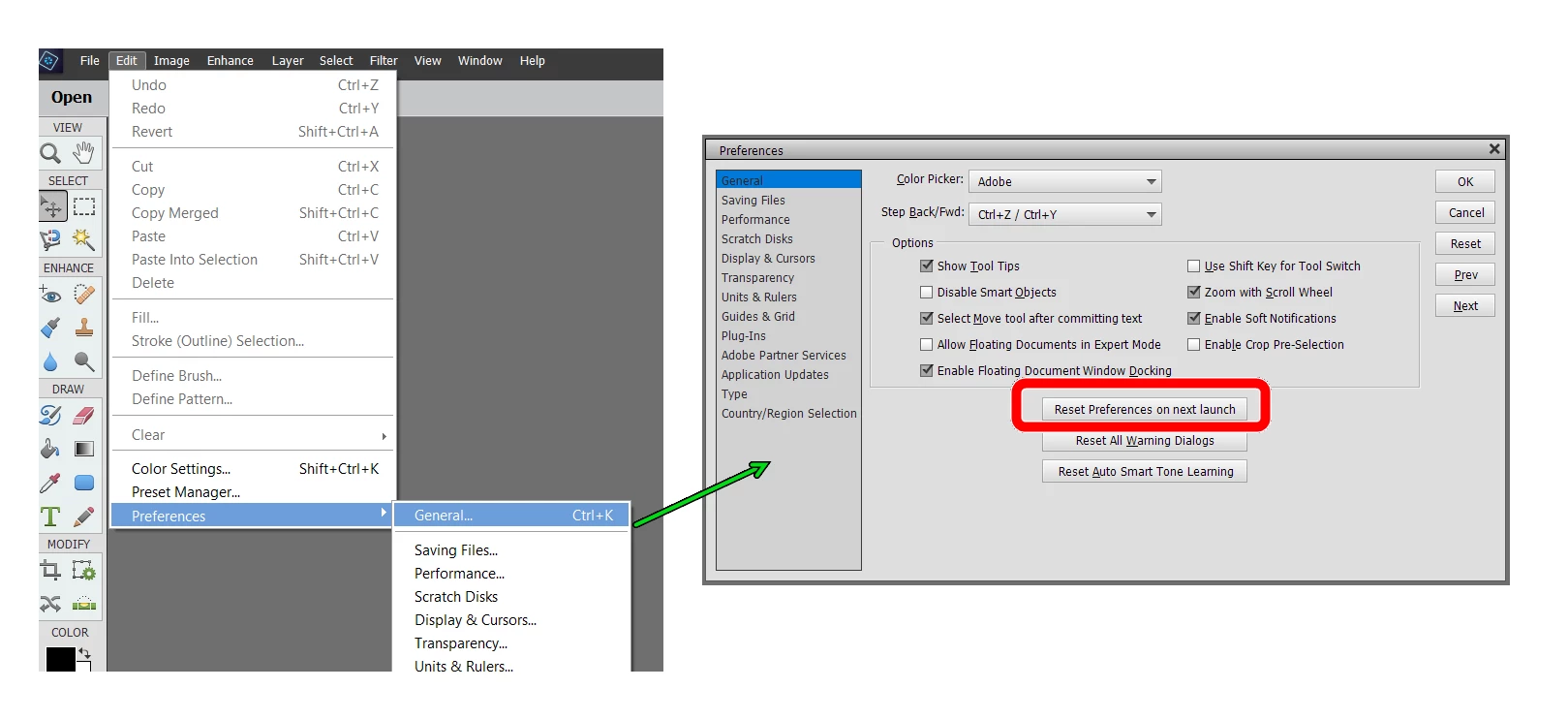
If that does not solve your problem, we need to know more from you. What kind of file are you trying to edit?
Are you sure the photo you are trying to edit is in color and not in black and white?
Please post a screenshot of your photo open in another program such as Windows Photos and also a screenshot of the same photo when you open it in Elements 2021.
Also attach a sample photo to your post or tell us what is the source of the photo and the format e.g. jpeg or raw.
Already have an account? Login
Enter your E-mail address. We'll send you an e-mail with instructions to reset your password.


 AdChoices