Participant
September 1, 2020
Answered

Photoshop 2020 User Interface Font Size

  • September 1, 2020
  • 1 reply
  • 2021 views

I just installed Photoshop Elements 2020 and the font size on the menu and toolboxes is tiny.  I'm guessing about 14pt.  My display is 1920x1080.   I've tried adjusting Windows 10's "Make text bigger" and it doesn't seem to have any effect.  Is there any way to get Photoshop to use a larger font for its user interface?

This topic has been closed for replies.
Correct answer Greg_S.

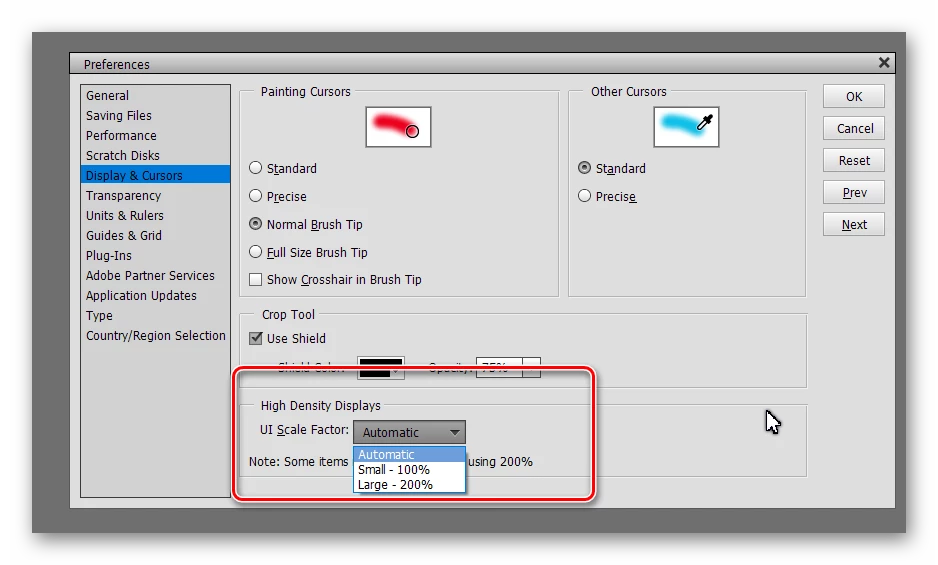
In the Editor's Edit>Preferences>Display and Cursors dialog, try changing the UI Scale Factor to 200%:


1 reply

Greg_S.
Community Expert
Greg_S.Community ExpertCorrect answer
Community Expert
September 1, 2020

In the Editor's Edit>Preferences>Display and Cursors dialog, try changing the UI Scale Factor to 200%:


Inspiring
August 19, 2022

Thank you for this!


As a new purchaser I find it pathetic that those are the only 2 options. On my 3440x1440 display, one is so small it I literally have to squint to see the menus at the top, the other is so large it looks like a preschool app and I don't see how I am supposed to use all the tools on the left