Participant
July 17, 2017
Answered

Photoshop cursor problem

  • July 17, 2017
  • 3 replies
  • 10089 views

When making fine adjustments to a picture the cursor gets a 'loading ring' round it. If I enlarge to c250% it works fine but back at normal size the white ring reappears and I can't get rid of it. Has anyone else had similar problems and worked out how to get rid of it?

Thanks

Henry

    This topic has been closed for replies.
    Correct answer hatstead

    Suggest that you reset the tool. To do that, look for a box with lines in it on the right of the tool's option bar. Click on this to reset.

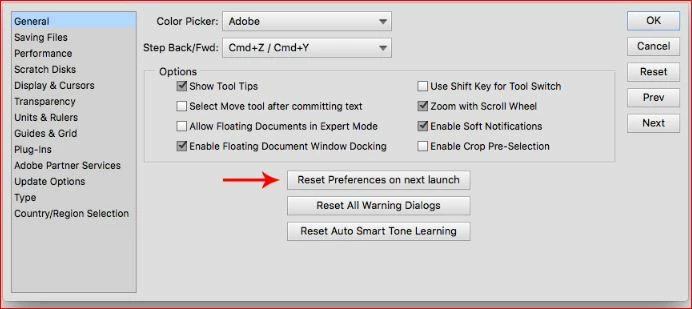
    If that does not fix it, reset global preferences to default. Go to Edit>Preferences>General and look for this:

    3 replies

    Participant
    January 11, 2022

    It isn't a selection problem but the process has a conflict issue with the document, as can be noted by the interferance at the top of the ducoment when it is used.

    Participant
    November 8, 2018

    Hi, I seem to have the same problem now. I have a Mac with Photoshop CC and every time I drag the mouse to paint, erase etc the dotted timer cursor appears. Help! I reset all general settings but no joy!

    MichelBParis
    Legend
    November 8, 2018

    georgetten41896863  wrote

    Hi, I seem to have the same problem now. I have a Mac with Photoshop CC and every time I drag the mouse to paint, erase etc the dotted timer cursor appears. Help! I reset all general settings but no joy!

    This is the Photoshop Elements forum, not the PhotoshopCC one:

    Photoshop

    Participant
    November 8, 2018

    Sorry, thanks

    hatstead
    Inspiring
    July 17, 2017

    purton  wrote

    fine adjustments to a picture the cursor gets a 'loading ring' round it. I

    What kind of adjustments? Please be more specific.

    purton  wrote

    'loading ring' round it.

    What is a loading ring? Never heard of it.

    What is it that you are trying to do?

    purtonAuthor
    Participant
    July 18, 2017

    we have recently installed to photoshop 15. Since then, when I pick up a

    fine brush to do a thin adjustment I get a white ring round the cursor and

    the menu for the brush size appears. This prevents me from being able to

    make the adjustment.

    Thanks for your help.

    Henry

    hatstead
    hatsteadCorrect answer
    Inspiring
    July 18, 2017

    Suggest that you reset the tool. To do that, look for a box with lines in it on the right of the tool's option bar. Click on this to reset.

    If that does not fix it, reset global preferences to default. Go to Edit>Preferences>General and look for this: