Known Participant
May 5, 2026
Answered

Photoshop Element 2025 Had 3 files that the pictures disappeared

  • May 5, 2026
  • 1 reply
  • 35 views

Had a problem with the Photoship elements 2025.  Had 3 files of pictures removed.  As yoI u see in the file below the files are there and I have tried to import them and it says the pictures are in the catalog.  When I hit all media nothing shows up.  The pictures are in the files when i look at them under the pictures in windows with the correct files.  When i googled the problem they stated you have to remove the applied filter.  I havent even used the photo editor yet so i am not that familiar with filters and using smarrt filters.  I would appreciate any help.  I have attached a photo of my screen.

Thank you

    Correct answer Greg_S.

    You haven’t given us enough information to understand your problem or what to do next.

    @mec4cast said:  Had 3 files of pictures removed.

    Your screenshot shows 3 folders of photo files (under Jobs in Progress).  Is that what you mean?

    Do you know how the files were removed from the Organizer grid (which is what I presume you mean)?

    Do you have ANY photos displayed in the Organizer?  If not, press Ctrl+1.  That is a toggle keystroke that turns the display of photos on and off.


    If that isn’t the problem, please tell us more about your situation.  

    Are you a new user of Elements?  

    Are these 3 folders the only ones that contain missing files?

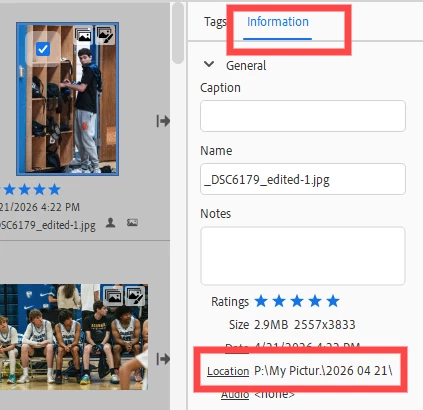
    Do you know the names of any of the missing files?  If so, press Shift+Ctrl+K.  This will present a dialog where you can enter the file name or a portion of it to search your catalog.  If you find the correct file, select it in the grid and look under the Information panel on the right and it will show which folder the catalog has recorded as the location of the file.


    1 reply

    Greg_S.
    Community Expert
    Greg_S.Community ExpertCorrect answer
    Community Expert
    May 5, 2026

    You haven’t given us enough information to understand your problem or what to do next.

    @mec4cast said:  Had 3 files of pictures removed.

    Your screenshot shows 3 folders of photo files (under Jobs in Progress).  Is that what you mean?

    Do you know how the files were removed from the Organizer grid (which is what I presume you mean)?

    Do you have ANY photos displayed in the Organizer?  If not, press Ctrl+1.  That is a toggle keystroke that turns the display of photos on and off.


    If that isn’t the problem, please tell us more about your situation.  

    Are you a new user of Elements?  

    Are these 3 folders the only ones that contain missing files?

    Do you know the names of any of the missing files?  If so, press Shift+Ctrl+K.  This will present a dialog where you can enter the file name or a portion of it to search your catalog.  If you find the correct file, select it in the grid and look under the Information panel on the right and it will show which folder the catalog has recorded as the location of the file.


    mec4castAuthor
    Known Participant
    May 5, 2026

    Thank you!   That worked.  I was trying to move old jobs to an external hard drive..I have been running out of space on my c drive.  I was in the organizer when this problem happened.  I have had photoshop elements for a long time.  I use it for organizing both my work and personal pictures.  I dont fully use the whole program which i need to learn.  Do you know of any good learning program online that I can use to learn this program?  Again thank you.  Everything i read online didnt mention the ctr key +1