Participant
January 8, 2025
Answered

photoshop element 22 camera raw 14 no mask settings

  • January 8, 2025
  • 2 replies
  • 281 views

hello 

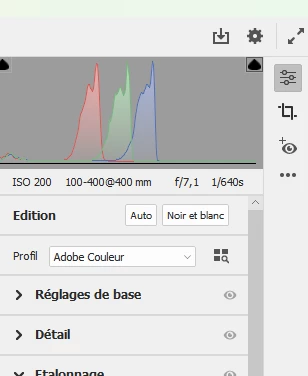
i have PHOTOSHOP elements 22 with CAMERA RAW 14.1 but i have not the settings for mask :can you help me  ?thanks !
 

Correct answer Greg_S.

You are watching a YouTube video for Photoshop Creative Cloud, not Photoshop Elements.   Many of the ACR features available in the full Photoshop program are not present in the Elements version.  Masking is one of those features.

2 replies

Greg_S.
Community Expert
Greg_S.Community ExpertCorrect answer
Community Expert
January 8, 2025

You are watching a YouTube video for Photoshop Creative Cloud, not Photoshop Elements.   Many of the ACR features available in the full Photoshop program are not present in the Elements version.  Masking is one of those features.

Participant
January 17, 2025

hello Greg

Thank you very much for your clear answer !

François

Glenn 8675309
Legend
January 8, 2025

Masking has nothing to do with camera raw.   layer masking is found in the spot the arrow is pointing to.

The screenshot you see is from pse 2025- in all other versions it's "expert" and not advanced. 


Participant
January 8, 2025

Hello thank you for this answer  , i understand that your screen is from pse2025 and  i thought at first it was an issue with the version but i have seen  that this option was present in camera version 14.1 , for ex in a utube video from which i took a screen shot ...

You can see there is a new icon that lead to a menu to select (sky ..etc..) ...
