
sabins99026860
Participant
March 31, 2017
Answered

Photoshop Elements 11

  • March 31, 2017
  • 1 reply
  • 333 views

I use Windows 7 Home Premium and Photoshop Elements 11.

I’m 79 years old and therefor I dare not use a newer version of Photoshop Elements.

Due to a great crash of my very old Desktop, I installed Photoshop Elements 11 on my
laptop, also working with Windows 7.

Everything works perfectly.

But when I corrected and saved a photo in the Editor and go back to the Organizer, I can’t
see the original photo next to the new saved photo.

What can Ichange in the installation to see both photos next of each other in the
Organizer?

Many, many, may, manys for your help and best greetings from Belgium,

Sabin Schoofs.
    This topic has been closed for replies.
    Correct answer 99jon

    Use the menu for saving:

    File >> Save As

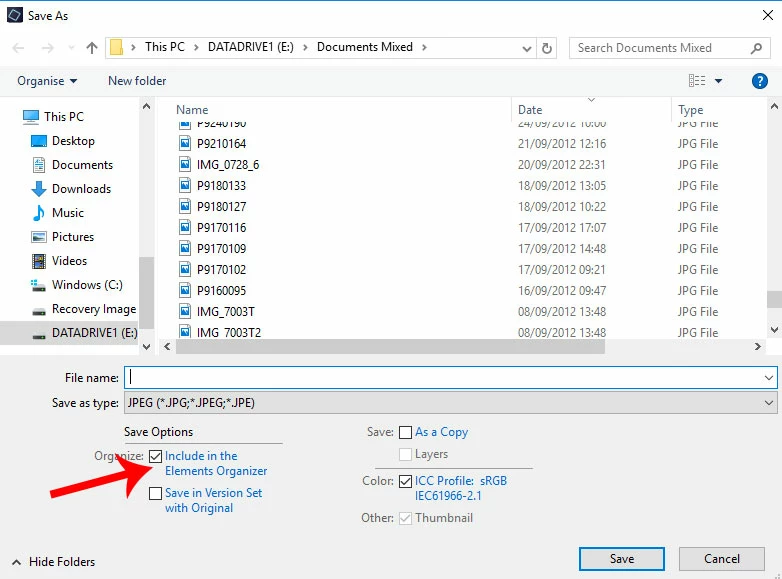
    Choose a new file name and ensure you check the box to save into a version set – see image below.

    You will find it is possible to expand and contract the set in organizer by clicking to the right of the thumbnail border.

    1 reply

    99jon
    99jonCorrect answer
    Legend
    March 31, 2017

    Use the menu for saving:

    File >> Save As

    Choose a new file name and ensure you check the box to save into a version set – see image below.

    You will find it is possible to expand and contract the set in organizer by clicking to the right of the thumbnail border.