Participant
March 13, 2018
Answered

Photoshop Elements 13 cannot open RAW file [from Canon 80D]

  • March 13, 2018
  • 3 replies
  • 1596 views

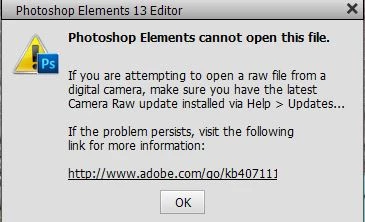
I have tried to open a RAW file in Photoshop Elements 13, but I keep getting the following message.  I have ran an update, and I also double checked that my Canon 80d camera is supported, and I am still getting this message.  I really appreciate any help with this.
 

This topic has been closed for replies.
Correct answer Little_Pale_Face

Hi,

All camera manufacturers keep changing their RAW formats.

The Canon 80D requires a minimum camera raw version 9.5

Unfortunately, PSE 13 will not support that version.

Your options are to either upgrade to a newer version of PSE or use the free Adobe DNG converter. The DNG converts the Canon raw file to the Adobe raw format which you can then edit with PSE 13. See following for mor information.

Digital Negative (DNG), Adobe DNG Converter | Adobe Photoshop CC

Brian

3 replies

Participant
January 5, 2022

I am getting the same message trying to open files from a Sony A7RIII.

Camera Raw is updated.

When I check the link it says I need Minimum Camera Raw plug-in version required 10.1

When I click on Help/About Plug In/Camera Raw/ it shows version 10.3.0.933

John Waller
Community Expert
Community Expert
January 5, 2022

@Kevin22509224da8f 


Which version of Photoshop Elements are you running?


If it's Elements 13 (as discussed in this thread) then that version cannot be updated beyond Camera Raw 9.0.


Confirm your version of Elements and that will assist us to guide you further.

Participant
January 5, 2022

Hello John,

I am using Photoshop Elements 18.


Participant
March 14, 2018

Thank you.  That makes sense.

Little_Pale_Face
Little_Pale_FaceCorrect answer
Inspiring
March 13, 2018

Hi,

All camera manufacturers keep changing their RAW formats.

The Canon 80D requires a minimum camera raw version 9.5

Unfortunately, PSE 13 will not support that version.

Your options are to either upgrade to a newer version of PSE or use the free Adobe DNG converter. The DNG converts the Canon raw file to the Adobe raw format which you can then edit with PSE 13. See following for mor information.

Digital Negative (DNG), Adobe DNG Converter | Adobe Photoshop CC

Brian