
Participant
June 15, 2017
Answered

Photoshop Elements 14. The sharpen picture tool has stopped working. How fix?

  • June 15, 2017
  • 1 reply
  • 1748 views

We have had Elements 14 since it came out, and today, the sharpen tool will in work either in the "quick" or any of the other kinds of help. What do I need to do to get that back?  Elements was downloaded  when purchased.

[Moved from the Lounge (which is where you can "connect with your peers" from across all of Adobe's products for conversations that don't directly relate to help and support) to a product-specific support forum - moderator]
This topic has been closed for replies.
Correct answer hatstead

SKF165  wrote

We have had Elements 14 since it came out, and today, the sharpen tool will in work either in the "quick" or any of the other kinds of help. What do I need to do to get that back?  Elements was downloaded  when purchased.

The above is not clear to me. The Sharpen tool is in the same slot with the Blur and Smudge tools. Press R on the keyboard to toggle among them.

Once you have the Sharpen tool , on the tool's option bar, look for a box with lines in it on the right. Click on this to reset the tool.

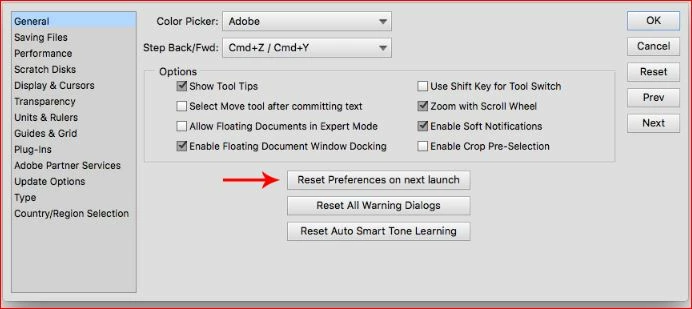
If that does not fix it, reset global preferences to default. To do that, go to Edit>Preferences>General and look for this:

1 reply

hatstead
hatsteadCorrect answer
Inspiring
June 15, 2017

SKF165  wrote

We have had Elements 14 since it came out, and today, the sharpen tool will in work either in the "quick" or any of the other kinds of help. What do I need to do to get that back?  Elements was downloaded  when purchased.

The above is not clear to me. The Sharpen tool is in the same slot with the Blur and Smudge tools. Press R on the keyboard to toggle among them.

Once you have the Sharpen tool , on the tool's option bar, look for a box with lines in it on the right. Click on this to reset the tool.

If that does not fix it, reset global preferences to default. To do that, go to Edit>Preferences>General and look for this:

SKF165Author
Participant
June 15, 2017

Thanks for your suggestions.  I will try doing that.

The Sharpen tool I am speaking of is on the right of the "Quick" screen of fixing pictures. There are also tools listed such as "smart fix, explosure, lighting, color balance". When going into the "Enhance" tab at the top, the sharpen picture up there is not working either.

Peru Bob
Community Expert
Community Expert
June 15, 2017

Does it work an another photo?  Try one that needs a lot of help.