
Answered
Photoshop Elements 15 - Getting rid from grid
Please help to get rid of grid: clicking on "plain" square does not work.
I've even reinstalled the program, but grid still present with any photo opening.

Please help to get rid of grid: clicking on "plain" square does not work.
I've even reinstalled the program, but grid still present with any photo opening.
Hi Mark,
You need to uncheck the following option : Grid Lines, from view menu :
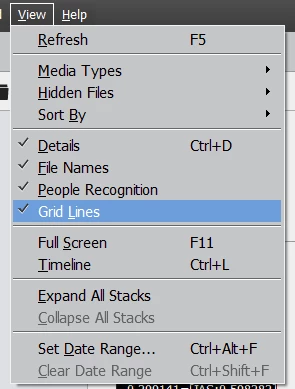
Please let me know in case your query is about some thing else.
Would be glad to assist you further.
Thanks,
Arshla
Already have an account? Login
Enter your E-mail address. We'll send you an e-mail with instructions to reset your password.
 AdChoices