
November 25, 2016
Answered

Photoshop Elements 15 won't open jpegs

  • November 25, 2016
  • 2 replies
  • 2312 views

I am using Photo Mechanic 5 and have it set to 15 as my default application to edit photos. When I click edit for an image in Photomechanic I get this message:

the document .....could not be opened. Adobe Photoshop Elements 15 cannot open filed in the "JPEG image" format. What am I missing? I have see all formats selected on my iMac so not sure if this is for real or am I missing a setting. I hope someone can answer this. Thanks.

Ed
    This topic has been closed for replies.
    Correct answer Jeff Arola

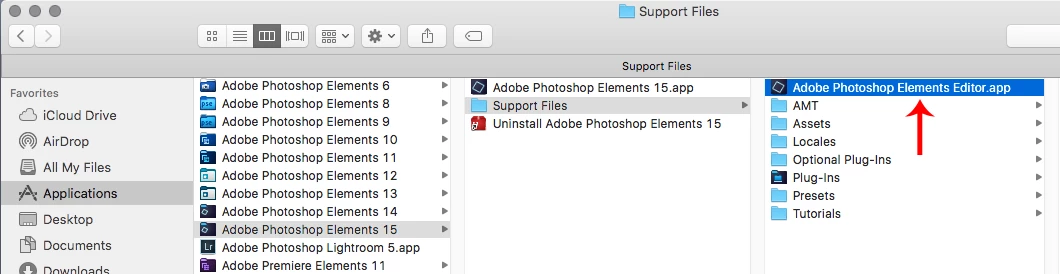
    When you specify the path to pse 15 you want to use the Adobe Photoshop Elements Editor.app

    in

    /Applications/Adobe Photoshop Elements 15/Support Files

    The error your seeing occurs if one points to the Adobe Photoshop Elements 15.app instead.

    2 replies

    Jeff Arola
    Community Expert
    Jeff ArolaCommunity ExpertCorrect answer
    Community Expert
    November 26, 2016

    When you specify the path to pse 15 you want to use the Adobe Photoshop Elements Editor.app

    in

    /Applications/Adobe Photoshop Elements 15/Support Files

    The error your seeing occurs if one points to the Adobe Photoshop Elements 15.app instead.

    November 27, 2016

    Oh my gosh, it’s a Christmas miracle or at least some great info form a pro. thanks so much for this. Now it works perfectly.

    Ed

    mytaxsite
    Inspiring
    November 25, 2016

    Try to open these files in PSE15 editor and see if they work.  They don't work then clearly something is wrong with the files.

    November 26, 2016

    Thanks for the reply but I can open up all my files in the PSE 15 editor no problem. The problem is that when I am looking at photos in a open folder in Photo Mechanic 5 then try and open a photo from there it gives me that message. We worked this way at work and just hit the edit symbol while in Mechanic and the image would open in Photoshop on our screen. Maybe that is what I'm trying to figure out is if this is possible in  PSE 15 or not. Seems like it should but again, maybe I'm missing a setting or something. Looked through the PSE 15 for dummies and can't find any answers.

    mytaxsite
    Inspiring
    November 26, 2016

    It looks like you'll need to ask in their forums because not many people here are likely to be using mechanics 5.  I am definitely not using it so I can't say why it doesn't recognize jpg files or why it doesn't connect correctly with Adobe products.