
Photoshop Elements 19 Printing to the Wrong Printer
I print to multiple printers from Elements 2019, but now Elements 2019 seems to be "stuck" on my Canon Pro9000 Mark II, my home printer. At work I need to print to my Epson 310 the default printer. File>Print> Canon Pro9> select my Epson. It does it's little dance and "Select Printer:" is set to Epson. "Print" and it brings up the "Canon Pro9000 Mark II" printer and I get the error that the Canon Pro9000 is offline.
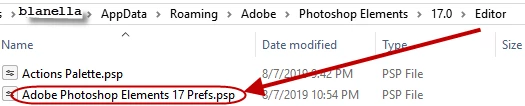
An old solution suggested resetting or "cleaning" the preference files and gave the location. Windows Vista / 7 / 8 / 10: C:\Users\[user name]\AppData\Roaming\Adobe\Photoshop Elements\{version number}\Editor.
Elements 2019 is not even listed as a version I have installed. For that matter, I installed PSE2018 also and 18 is not listed. Versions 14, 15 and 17 are there but nothing later.
I have rebooted my Windows 10 PC; unloaded and reloaded PSE2019. Where else does PSE retain preferences that may have been set? I have printed to the Epson MANY, MANY, MANY times at work. Over the weekend I printed to my Canon at home over a period of a few days, and now PSE2019 seems to be stuck on the Canon.
I can print to the Epson in MSWord just fine. I can print to the Epson from Windows Photo Viewer. This seems to be an Elements 2019 problem.
Can someone please help me?
Thank you--


 AdChoices