
Participant
August 18, 2023
Answered

Photoshop Elements 2 questions- Skin Tan Lines

  • August 18, 2023
  • 4 replies
  • 1761 views

Photoshop Elements- 2 questions about Skin Tan lines. I need detailed step-by-step instructions, please. (the bandaid clone tool does not do what we would like to look realistic). 

 1. How do I remove tan lines on leg at the bottom of shorts? The bandaid tool that matches area does not seem to be thr best approach.

2. How do I make feet in high heels that are extremley white (tennis player has legs tanned but feet are white because of shoes). How do I make the feet tan. That are in black stappy high heels?
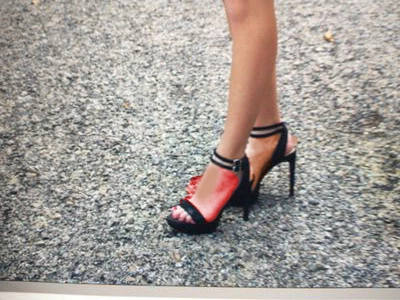
This topic has been closed for replies.
Correct answer hatstead

@Teacher317604688m53

Try this:

1. Open the picture file. I used the one with the shoes for demonstration

2. Activate the Magnetic lasso tool and make a selection of  the white skin of the left foot.

3. Once the selection is complete, place it in its own layer. Press  CTRL+J

4. Open a Hue/saturation adjustment layer above this and link the 2 layers. Press CTRL+G

5. In the dialog that opens, check the "Colorize" box, and work the Hue/saturation/lightness sliders to match the skin tone of the left leg.

6. Merge the 2 layers  Press CTRL+E

7. Repeat steps 2-5 for the right foot.


4 replies

hatstead
hatsteadCorrect answer
Inspiring
August 19, 2023

@Teacher317604688m53

Try this:

1. Open the picture file. I used the one with the shoes for demonstration

2. Activate the Magnetic lasso tool and make a selection of  the white skin of the left foot.

3. Once the selection is complete, place it in its own layer. Press  CTRL+J

4. Open a Hue/saturation adjustment layer above this and link the 2 layers. Press CTRL+G

5. In the dialog that opens, check the "Colorize" box, and work the Hue/saturation/lightness sliders to match the skin tone of the left leg.

6. Merge the 2 layers  Press CTRL+E

7. Repeat steps 2-5 for the right foot.


Greg_S.
Community Expert
Community Expert
August 19, 2023

There are several different approaches to take.  Here are a couple:


  1. Use the color picker to choose the desired color for the white skin
  2. Use the Brush Tool (B) and select the Color mode in the tool options


3.  Paint over the white skin with the brush to get a result something like the following:


Alternatively, (and I am assuming you are using a recent version of Elements, not version 2), you can use the Enhance>Colorize Photo dialog (in Manual Mode) to select the white skin, add a colorize droplet, and use the color picker to find the right color tone.  Your screenshot was very pixelated, making it difficult to find a good color.  I believe you can do much better than my sample below if you have a photo with sufficient resolution.


Glenn 8675309
Legend
August 19, 2023

The kids at the school only have access to PSE 2--  

Greg_S.
Community Expert
Community Expert
August 20, 2023

@Glenn 8675309 said:  The kids at the school only have access to PSE 2-- 


Or perhaps those old school kids have been taught sufficient grammar, punctuation and comprehension to understand when there is more than one question on the test.  😜

jane-e
Community Expert
Community Expert
August 19, 2023

@Teacher317604688m53 

I've moved your post from Photoshop to Photoshop Elements for you. They might ask you to post an image so they can better assist.


Jane

Participant
August 18, 2023

1. How do I remove tan lines on leg at the bottom of shorts? The bandaid tool that matches area does not seem to be the best approach. 2. How do I make feet in high heels that are extremley white (tennis player has legs tanned but feet are white because of shoes). How do I make the feet tan that are in black stappy high heels?


Please provide step-by-step instructions so that high school

students can edit their photographs. Thanks

Glenn 8675309
Legend
August 18, 2023

This will be difficult to provide help with for many:  PSE 2 was released 21 years ago.   For example:  I can't even get the installer to work on my computer.  A previous thread spoke about it not working if you had more than 1 TB of free space on your hard disk.

Some may see your request for help.

I'm curious: what district is having kids use software that is more than 20 years old?