Zygmund
Participant
June 16, 2019
Answered

Photoshop Elements 2019 - Layer Style Window

  • June 16, 2019
  • 2 replies
  • 761 views

I've just purchased Photoshop Elements 2019. In expert mode, is there any way to enable the old layer style window as seen below?
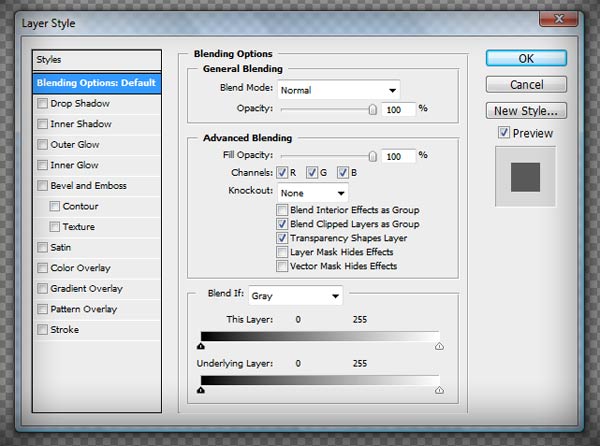

Layer_Style_Window.jpg

    This topic has been closed for replies.
    Correct answer Greg_S.

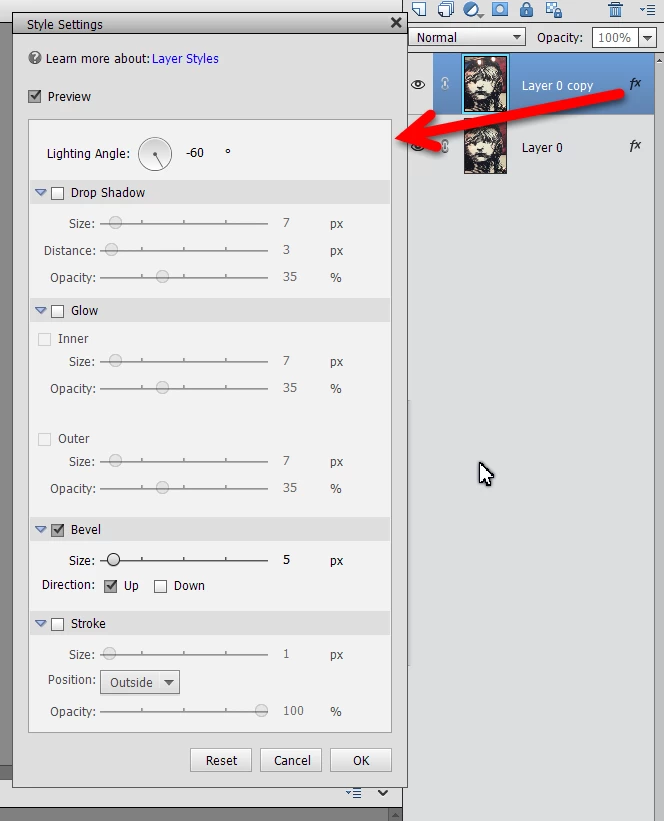
    . . .  or you can click on the layer fx button to open the settings dialog:
    2 replies

    Greg_S.
    Community Expert
    Greg_S.Community ExpertCorrect answer
    Community Expert
    June 16, 2019

    . . .  or you can click on the layer fx button to open the settings dialog:

    Bojan Živković11378569
    Community Expert
    Community Expert
    June 16, 2019

    Old style Layer Style window in which application? Your screenshot is showing, I believe Photoshop's Layer Style dialog which is different from Photoshop Elements.

    Zygmund
    ZygmundAuthor
    Participant
    June 16, 2019

    Right, I just found that screenshot in a Google image search to use as an example. Is that window not available in the Elements version of Photoshop?

    Thanks for your response!

    Bojan Živković11378569
    Community Expert
    Community Expert
    June 16, 2019

    There is Style Settings (Layer > Layer Style > Style Settings) dialog with fewer options in Photoshop Elements.