

eldenf
Participating Frequently
April 16, 2020
Answered

Photoshop Elements 2020.1 not compatible with high res screen

  • April 16, 2020
  • 4 replies
  • 1488 views

I run Windows 10 on my iMac. The screen resolution is 5120 x 2880... with scaling set at 200%. These are the recommended settings.


However, Photoshop Elements is all messed up. Where certain buttons and controls should be in the app... they are missing. Instead there is just black space. The program is virtually unusable because of all the missing controls. Any ideas as to a fix?


I've attached a screen capture of the bottom of the program where some controls should be.
This topic has been closed for replies.
Correct answer Jeff Arola

Go to


C:\Program Files\Adobe\Photoshop Elements 2020


right click on the


PhotoshopElementsEditor.exe


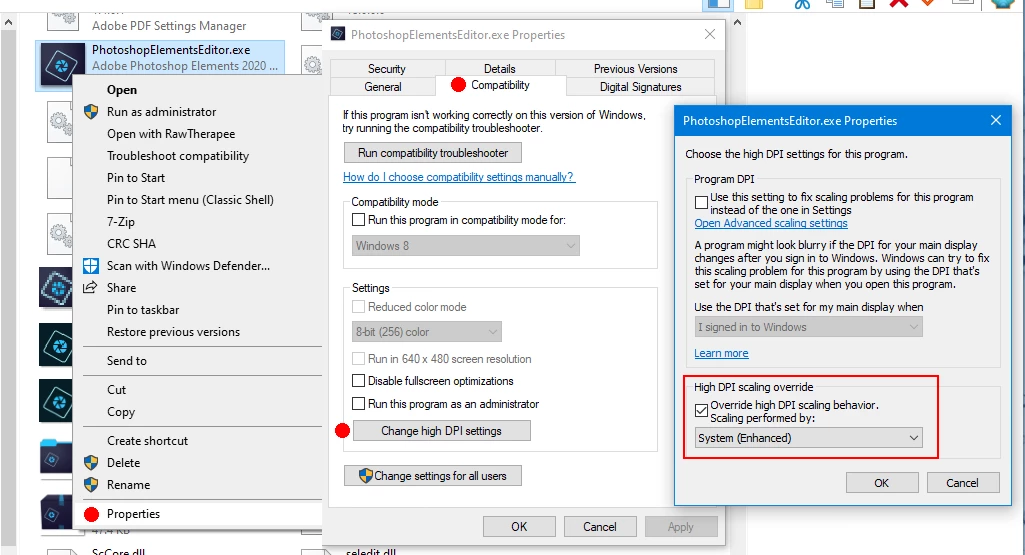
select Properties>Compatibility>Change high DPI settings and enable High DPI scaling override to System or System Enhanced and see if that makes any difference.


4 replies

Jeff Arola
Community Expert
Jeff ArolaCommunity ExpertCorrect answer
Community Expert
April 18, 2020

Go to


C:\Program Files\Adobe\Photoshop Elements 2020


right click on the


PhotoshopElementsEditor.exe


select Properties>Compatibility>Change high DPI settings and enable High DPI scaling override to System or System Enhanced and see if that makes any difference.


eldenf
eldenfAuthor
Participating Frequently
April 18, 2020

Thank you for the tip Jeff. I will give that a try.

Greg_S.
Community Expert
Community Expert
April 16, 2020

A 5K monitor is unusual hardware for an Elements user.  I suspect the developers didn't do much testing with it.


Have you tried using different OS scaling?  Perhaps 150% instead of 200.

eldenf
eldenfAuthor
Participating Frequently
April 16, 2020

Yep. I do believe the 5K monitor is the root of the issue. I will try using 150% tonight and post the result. Thanks for the suggestion.


I do see, in the Photoshop Elements preferences, where I can set the zoom level manually. Setting it to 200% didn't help. And there is even a warning on that panel indicating potential problems with doing so.

Greg_S.
Community Expert
Community Expert
April 16, 2020

Sorry, I focused on you using Windows 10.  I didn't notice that you are using a virtual machine in iMac.  The taskbar control is a right-click in Windows.  I have no idea what happens on an iMac.  And why are you not using the native Mac program for Elements?

eldenf
eldenfAuthor
Participating Frequently
April 16, 2020

I am not using a virtual machine on my iMac. I am running Windows on my iMac natively. This is why I'm not using the Mac version of Photoshop Elements. Because I am not running macOS on my iMac.


So anything that applies to Windows 10 will also apply to me... since I'm running Windows 10.


So back to my question... are you referring to some taskbar setting in Photoshop Elements? This is where I am lost.

Greg_S.
Community Expert
Community Expert
April 16, 2020

Do you have the taskbar set to hide automatically?

eldenf
eldenfAuthor
Participating Frequently
April 16, 2020

Taskbar? Where would I find settings for a taskbar in Photoshop Elements?


These missing controls are at the bottom of the Photoshop Elements screen, and also at the top.


In general... when I mouse over the controls, they appear.