Rüdiger2309361733nx
Participant
February 10, 2022
Question

Photoshop Elements 2020 Darstellung Arbeitsbereich

  • February 10, 2022
  • 2 replies
  • 368 views

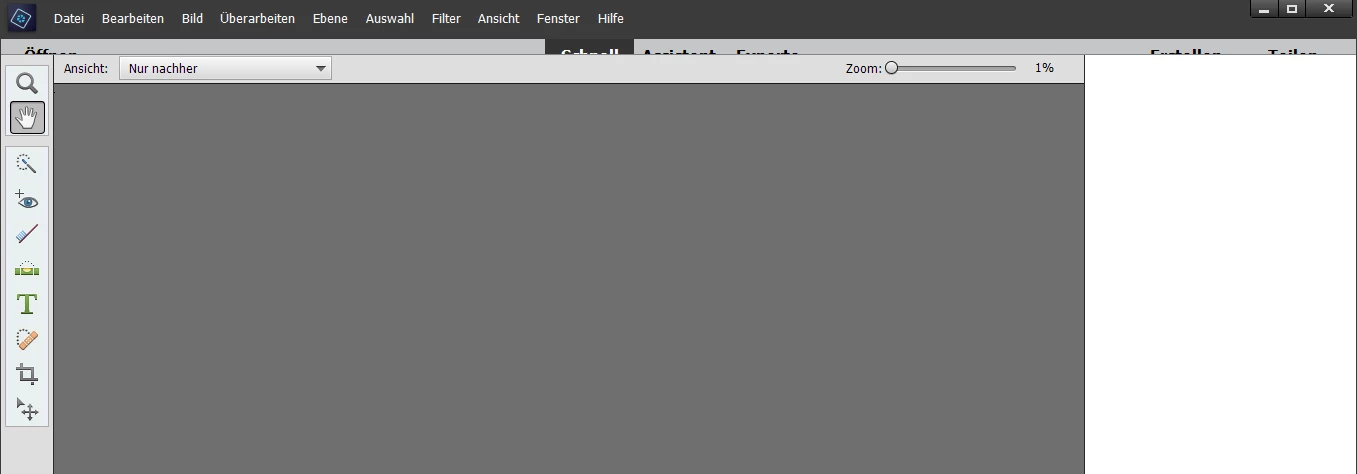
Seit kurzem ist der Arbeitsbereich zu groß dargestellt, dass die Leiste mit "Schnell", "Assistent", "Experte" kaum mehr sichtbar sichtbar ist. Wie kann man das einstellen?

 

This topic has been closed for replies.

2 replies

Medha_Sharma
Adobe Employee
Adobe Employee
February 18, 2022

Hello,


Can you please try resetting the preferences and let us know if that helps? To do so, press Ctrl + K and click on the 'Reset Preferences on next launch' button. Then try to re-launch the application.


If this doesn't work, please share your screen resolution with us.


Regards,

Medha Sharma


Participant
July 26, 2023

Dear Sir or Madam!

I also have the problem that the bars are not visible and the suggested procedure, namely "press Ctrl + K and click on the 'Reset Preferences on next launch' button. Then try to re-launch the application" is not the problem. I recently changed my system and am now working with an HP ENVY Otto-in-Weeks Desktop 34 with a screen resolution of 5120 to 2160.

A screenshot of my problem can be found attached.

I would be grateful for a suggestion for a solution, otherwise I would have to get another image editing program.

Thanks in advance for your effort and best regards from Vienna


Ann Bens
Community Expert
Community Expert
February 10, 2022

Moved to PS Elements forum.