Participant
March 24, 2025
Question

Photoshop Elements 2022 RAW Dateien von der Nikon Z8.

  • March 24, 2025
  • 5 replies
  • 195 views

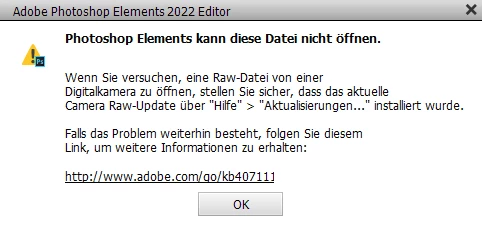
Ich kann die RAW Dateien aus der Nikon Z8 nicht in Photoshop Elements 2022 öffnen.

Mit Bildern von der Nikon Z6 funktioniert es.
5 replies

Greg_S.
Community Expert
Community Expert
March 26, 2025

Jeff, thanks for pointing out that ACR 17.2 will work with Elements 2022.  For some reason, it didn't when I tried it earlier.  And it seems like the workaround has only been available for two ACR version updates after the last official update for an Elements release.  For Elements 2022, that was ACR 14.

Jeff Arola
Community Expert
Community Expert
March 26, 2025

Camera Raw 17.2 should work in PSE 2022 on both Windows and Mac, but it depends on wether or not your graphics card is up to the task.


If you install Camera Raw 17.2 and get a message about the GPU not be up to pare when you try to open a camera raw file, then falling back to one of the Camera Raw 15.0 plugins that doesn't require the GPU or using the Adobe DNG Converter are the other options.


PSE 2022 on Windows 10 with Camera Raw 17.2


sample Nikon Z8 nef from here:

https://photographylife.com/nikon-z8-sample-images-raws

Greg_S.
Community Expert
Community Expert
March 24, 2025

Note that the instructions for updating Camera Raw in the original post linked by Jeff will take you to a download for ACR 17.  That will not work on Elements 2022. 

If you only need to process NEF files from your Z8 (not NEFX), you can update to ACR 15.3  which you can download from Archive.org using this link.

Bojan Živković11378569
Community Expert
Community Expert
March 24, 2025

Post moved to Photoshop Elements forum.

Jeff Arola
Community Expert
Community Expert
March 24, 2025

Besides upgrading to Photoshop Elements 2025, you have a couple of other options:


1. Update the current Camera Raw pluging in PSE 2022 by following the directions in this thread

   https://community.adobe.com/t5/photoshop-elements-discussions/manually-install-adobe-camera-raw-acr-nicer-to-look-at/td-p/14539971


or


2. Use the Adobe DNG Converter to convert the Nikon Z8 nef files to DNG copies, which should then open in PSE 2022

    https://helpx.adobe.com/camera-raw/using/adobe-dng-converter.html
