
Known Participant
July 19, 2024
Answered

Photoshop Elements 2022 won't import photos dated after 6/30/2024

  • July 19, 2024
  • 4 replies
  • 877 views

I just tried to Import some photos from my iPhone 13.  Those dated 6/30/2024 or earlier Imported as normal.  However, those dated 7/1/2024 and later do not even appear when I click on the Import and select Phone.  The only thing that was different this time from all of the other Imports I have done is, when I selected Phone I got a box with a bunch of dates.  I checked on the boxes with a 2024 date (example: 20241_, 20242_, etc),  I had no idea what I was doing, but knew I wasn't going to be importing any photos prior to 2024.
This topic has been closed for replies.
Correct answer Greg_S.

Try the following:

  • Start the Import>From Camera or Card Reader process
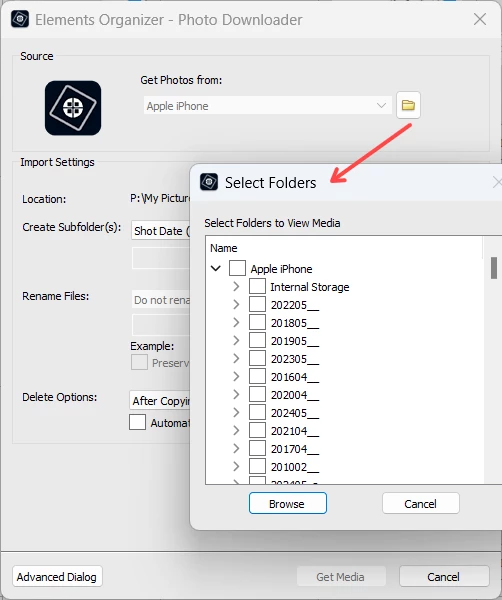
  • Select your iPhone and the program should either start a search for media on your phone or show a Select Folders icon next to the device's name.  If the search starts, click Stop, and the Select Folders icon should appear as shown in the following  screenshot.  Click on the icon and a dialog will open:


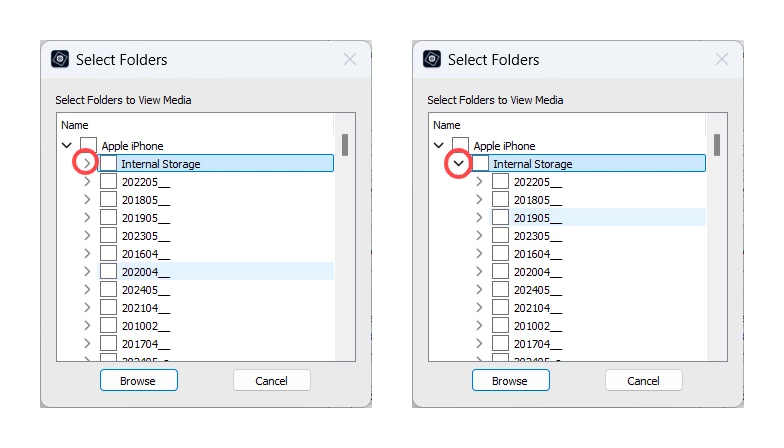
  • As you will see in the following screenshot, I have two duplicate hierarchies of folders.  The first hiearchy appears under Apple iPhone.  This has a sub-folder named Internal Storage and additional sub-folders that appear to have dates in no particular chronological order.  If I expand the Internal Storage sub-folder (by clicking on the chevron arrow), the hierarchy shows a set of dated sub-folders similar to the first set.  Although my screenshot shows identical sets of folders, my past experience has been that they are not always identical.


My suggestion to you is to make sure that all boxes are checked.  This should happen if you check the Apple iPhone box, but your setup may be different.  Start the Browse process and don't worry if files already in your catalog are found.  The files should be sorted in chronological order and you can use the checkboxes to select only the recent ones that are not in your catalog.

4 replies

Greg_S.
Community Expert
Community Expert
July 25, 2024

Hi Lou.  Here is a screenshot of the Duplicates toggle:


I also found it interesting that the folder structure of the iPhone displays differently between Elements 2022 and 2024.  I don't know whether this is because of the different catalogs that I was using or some other reason.  As I believe I said previously, the phones folders are not always listed chronologically.  See the examples in my following screenshot:


Greg_S.
Community Expert
Community Expert
July 24, 2024

I'm glad I was able to help you out. I think that the folder icon has only appeared for iPhones for the last 2 or 3 versions. It is easy to miss and doesn't always appear. 
For the future, you can still search the entire phone. There is a toggle button to ignore duplicates. So only new files will be copied to your computer (and imported into the catalog. )

Lou216Author
Known Participant
July 24, 2024
Sorry to bother you again, but where is the toggle button?
Greg_S.
Community Expert
Greg_S.Community ExpertCorrect answer
Community Expert
July 20, 2024

Try the following:

  • Start the Import>From Camera or Card Reader process
  • Select your iPhone and the program should either start a search for media on your phone or show a Select Folders icon next to the device's name.  If the search starts, click Stop, and the Select Folders icon should appear as shown in the following  screenshot.  Click on the icon and a dialog will open:


  • As you will see in the following screenshot, I have two duplicate hierarchies of folders.  The first hiearchy appears under Apple iPhone.  This has a sub-folder named Internal Storage and additional sub-folders that appear to have dates in no particular chronological order.  If I expand the Internal Storage sub-folder (by clicking on the chevron arrow), the hierarchy shows a set of dated sub-folders similar to the first set.  Although my screenshot shows identical sets of folders, my past experience has been that they are not always identical.


My suggestion to you is to make sure that all boxes are checked.  This should happen if you check the Apple iPhone box, but your setup may be different.  Start the Browse process and don't worry if files already in your catalog are found.  The files should be sorted in chronological order and you can use the checkboxes to select only the recent ones that are not in your catalog.

Lou216Author
Known Participant
July 23, 2024

Thanks so much, Gary!  With your help I finally was able to solve my issue.  In the "Get Photos from:" box I clicked on "Apple iPhone" and the thumbnails starting loading immediately.  When I hit STOP, it stopped at whatever thumbnail it had loaded.  I tried this a few times, letting it download all 200+ photos that it has be downloading after trying the STOP.  I finally realized that your directions said to click on the small file folder to the right of the "Get Photos from:' box.  When I clicked on the file folder icon it opened up one box with all of the photo dates of the photos in my iPhone. I clicked on the box that automatically clicked on all boxes and it downloaded all 1,500+ photos and videos that I have on my phone.  SUCCESS!


I have never know about the file folde icon in all the years I have used  since Photoshop Elements 11.  Today is 7/23/2024 and let's say I don't download photos again until 8/15/2024.  It seems that if I click on the file folder icon, I can select 20247 and 20248 and PE will download only the photos & videos dated in July and August of 2024.


Again, thanks for taking your time to give me your detailed instructions!

Greg_S.
Community Expert
Community Expert
July 19, 2024

I have found that there is no order to the folder hiearchy on the iphone.  Nor is there any consistency in how the folders are named. So you may have missed one of the folders that you wanted. 


Also, note that sometimes there are two  folder hiearchies on the iPhone.  I have always thought they were total duplicates.  But I suppose it is possible that they are not, and that your missing photos are in the other folder hierarchy structure. 

Lou216Author
Known Participant
July 20, 2024

I took more photos last night and when I go to Import>iPhone, the new photos, as well as my other photos taken after 6/30/2024, do not appear.  I'm an old dude and don't know much about computers, even though I have been Importing photos from my iPhone for years and years, I don't know what you mean by "hierarchies."  Are you suggesting this is an iPhone issue?


Funny, but when I tried to reply to your email that Adobe sent me via gmail, it bounced back with the following message:


Delivery has failed to these recipients or groups:


Adobe Community Mailer (noreply@mail.community.adobe.com)

Your message couldn't be delivered to the recipient because you don't have permission to send to it.

Ask the recipient's email admin to add you to the accept list for the recipient.