
Photoshop Elements 2024 stopped working
Hi,
Photoshop Elements 2024 suddenly stopped working after about 4 months of regular use.
I have changed nothing on my configuration, and it worked fine until some days ago on the very same computer.
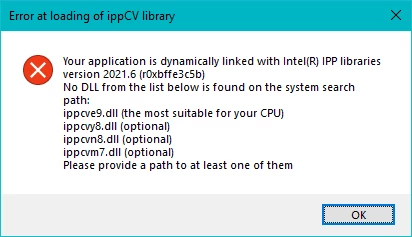
While starting, this message appears:
Your application is dynamically linked with Intel(R) IPP libraries version 2021.6 (r0xbffe3c5b).
No DLL from the list below is found on the system search path:
ippcve9.dll (the most suitable for your CPU)
...
Please provide a path for at least one of them
And then:
Application popup: PhotoshopElementsEditor.exe - Application Error : The application was unable to start correctly (0xc0000142). Click OK to close the application.
Operating system is:
Windows 10 Home
Version 22H2
OS build 19045.4170
Tried to unistall and reinstall, choosing the "delete preferences" option, still the same error.
Thank you for any advice.


 AdChoices