
Participant
February 14, 2025
Answered

photoshop elements 2025, cannot resize objects

  • February 14, 2025
  • 3 replies
  • 664 views

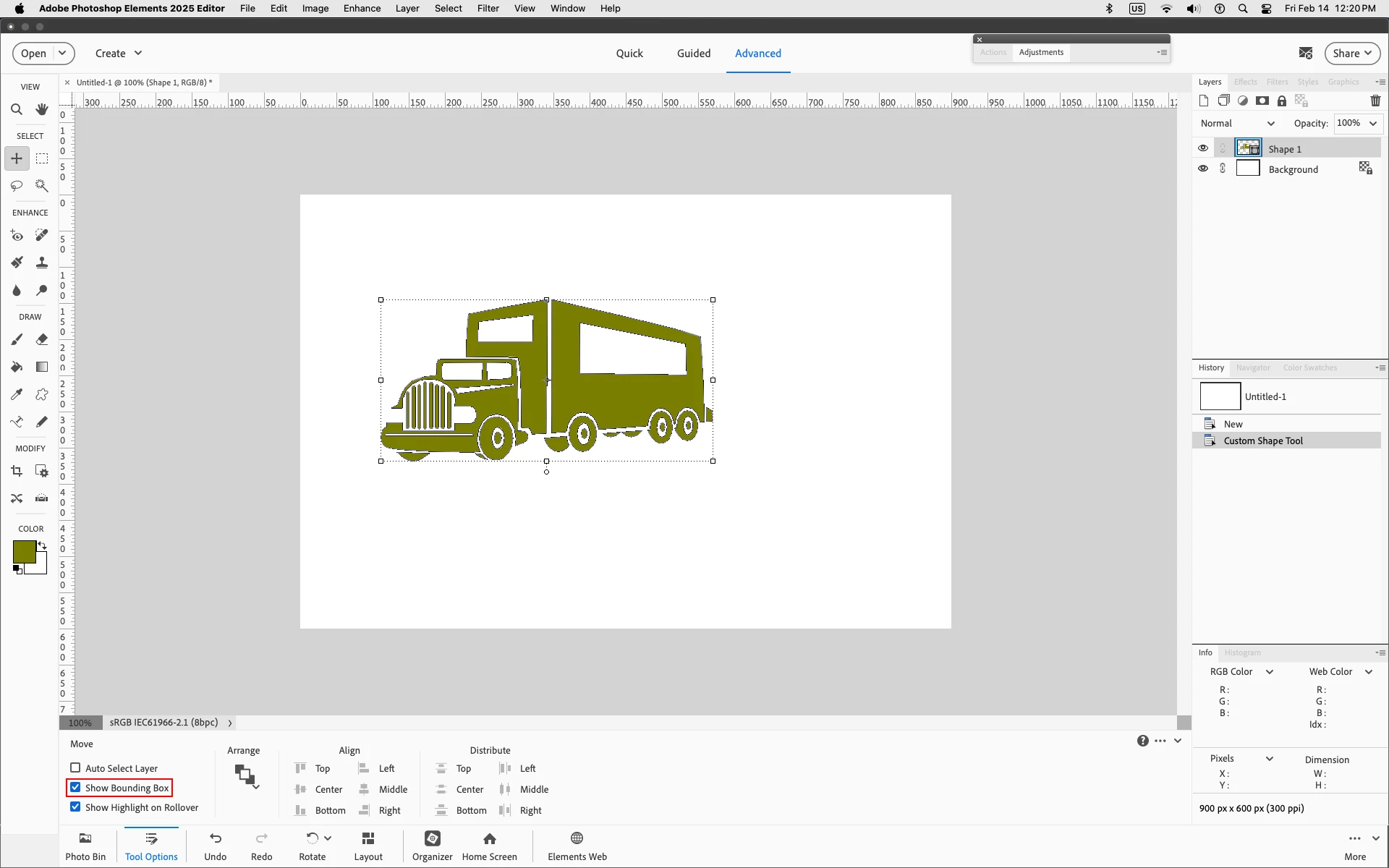
I installed photoshop elements 2025 on my mac and cannot resize obects. The resizing frame (with the squares  at corners so you can pull and push an object to resize and tilt) is missing. I reinstalled elements 2025 but that didn't help. Any ideas? Thanks
Correct answer Jeff Arola

If you have the Move Tool selected make sure Show Bounding Box is checked in the Tool Options


3 replies

Participating Frequently
July 2, 2025

I have Elerments 2010 and this has ALWAYS worked just fine. It is not NOW, nor do I HAVE a bounding box. The bottom of elements does not look like the screen shot where the bounding box is. Any suggestions?

Glenn 8675309
Legend
July 2, 2025

Tools options for 2010 are mostly found at the top of your screen.  They simply did not exist at the bottom in version 2010 as Jeff depicted in his response back in February.

This is from pse 2010.   I use it a bunch in troubleshooting stuff for people. 

Participating Frequently
July 2, 2025
Thank you, but you don't know where I can find it?

I've used Elements for 15 years and know most of the settings. I looked at every area of ot before I posted my question. Not sure WHY this option even changed oou of the clear blue after 15 years of using it. 🙄 any road map you can offer would be GREATLY appreciated!
Jeff Arola
Community Expert
Jeff ArolaCommunity ExpertCorrect answer
Community Expert
February 14, 2025

If you have the Move Tool selected make sure Show Bounding Box is checked in the Tool Options


Participant
February 14, 2025

That was it, Jeff. Thank you.

Participant
February 14, 2025

Got it. My "bounding box" was turned off.