
Participant
January 30, 2025
Question

Photoshop Elements 2025 Organizer Cloud Synchronisation Bug

  • January 30, 2025
  • 5 replies
  • 437 views

There seems to be a bug in the new cloud synchronisation of photoshop elements 2025. 


I'd like to use this sync in a way that pictures from the PC should not be uploaded into the cloud. But, pictures imported from the new mobile app should be synchronised via cloud with the PC.


My idea was configuring the sync like this:
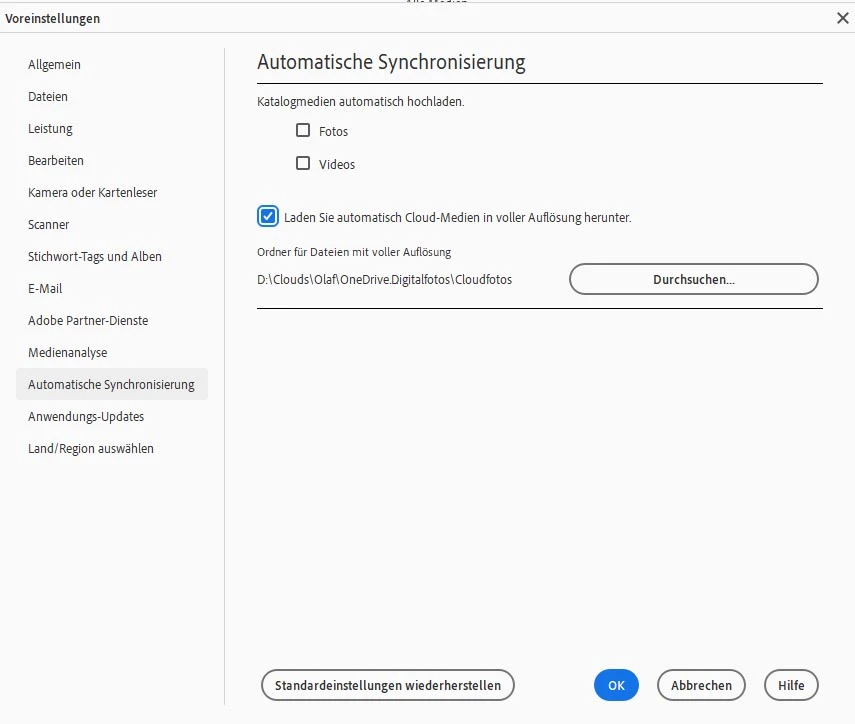
But unfortunately it always switches back to this automatically:
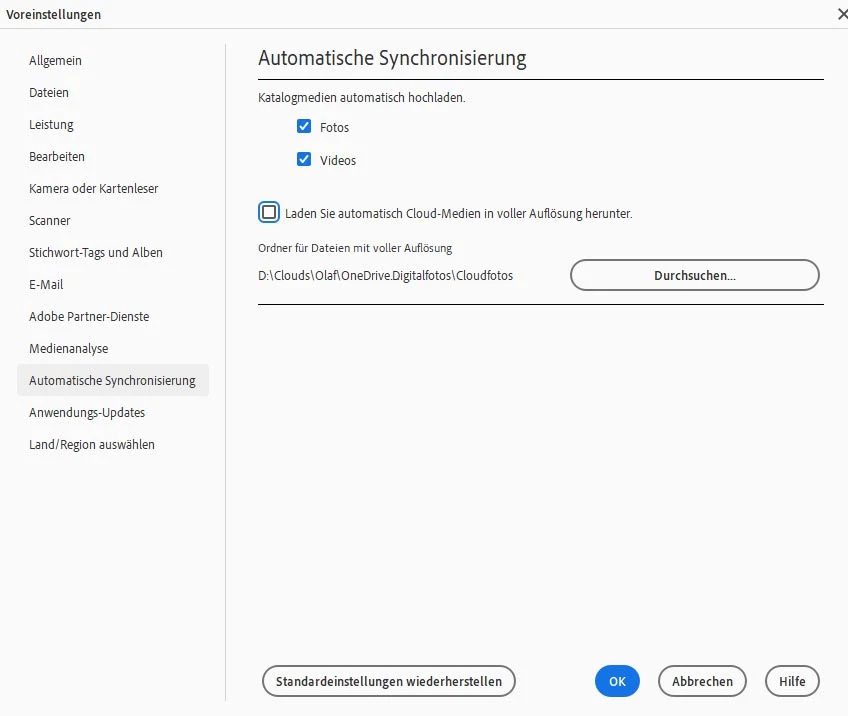
Does anybody have the same issue?

5 replies

Greg_S.
Community Expert
Community Expert
February 3, 2025

@Prateek M. , the OP is using Elements 2025. 


The correct path should be:

C:\ProgramData\Adobe\Elements Organizer\25.0\CAHeadless\AutoCreatorPrefs.xml


@O_S_27 if the file permissions are correct, either attach a copy of the .xml file or give us a screenshot of the contents.  You can use Wordpad to open it.


Adobe Employee
February 3, 2025

Hello, please check if the following file has all boxes checked for write permission for the user (Right click > Properties > Security):
C:\ProgramData\Adobe\Elements Organizer\24.0\CAHeadless\AutoCreatorPrefs.xml

Greg_S.
Community Expert
Community Expert
February 2, 2025

It seems to be working OK on my machine.


There was a similar problem with non-English versions of Elements 2024.  I suggest you try contacting Elements support. You can start a chat session by going to the Contact Adobe Support page. (https://helpx.adobe.com/contact.html?rghtup=autoOpen) Make sure you are signed into your Adobe account and try typing Agent when the chat window opens. (If you use my link, the chat window should open automatically.)


Please let us know if they are able to fix it for you.

Greg_S.
Community Expert
Community Expert
January 31, 2025

Photoshop Elements 2025.1 was released yesterday.  Please let us know if it fixes this issue for you.  Here are the release notes for the update.  Clearly there were some bugs with non-English versions of the program.  Hopefully, these have been fixed.

O_S_27Author
Participant
February 2, 2025

Hi Greg, tested it some minutes ago. The bug still exists. I made sure that 25.1 is installed and I tried to set the three checkboxes to foto and video off and download on and I failed again.
All other checkboxes in the settings dialogs seem to work correctly.

Michael B. UK
Inspiring
January 30, 2025

Is it only this page that switches back when you click OK?  Try to change something in the general section of preferences (Allgemeine) and see if that keeps it's settings. 

O_S_27Author
Participant
January 30, 2025

All other preferences seem to work. I adapted some and they stay and work.