Participating Frequently
October 15, 2025
Answered

photoshop elements 2026 free trial won't open

  • October 15, 2025
  • 3 replies
  • 443 views

Can't get beyond welcome page, and  get a msg "Cannot proceed because MSVCP140_ATOMIC_WAIT_dll not found.

Correct answer Greg_S.

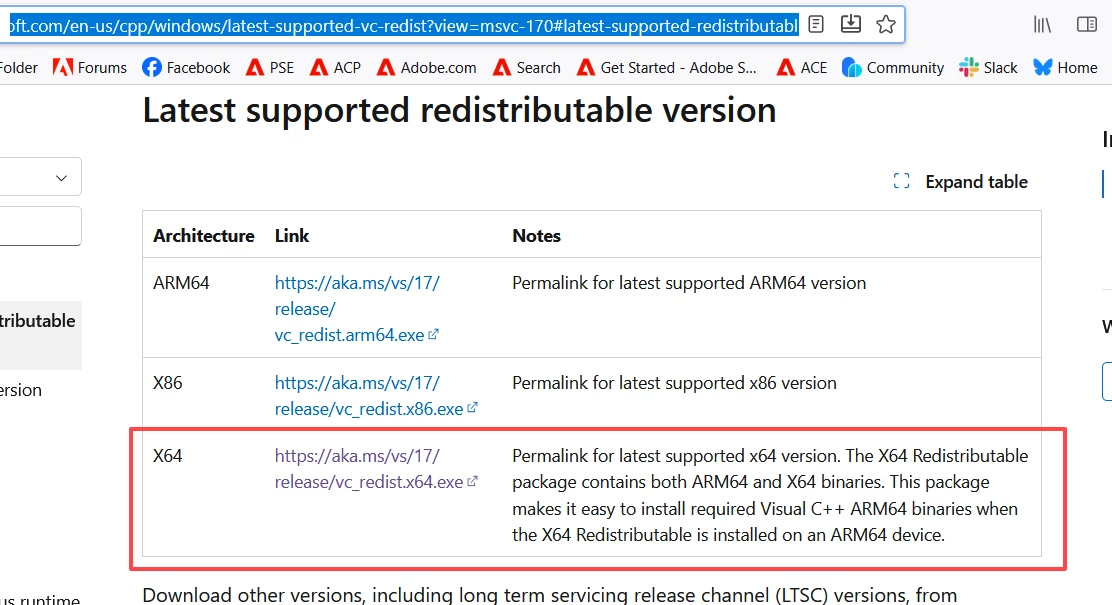
Here is a link to the download.  Click on the X64 link shown in my screenshot below and once it has downloaded to your computer, click on the .exe file.  If that is too technical for you, I suggest you contact HP Support.


3 replies

Participating Frequently
October 23, 2025
  • Kglad's response was too abrupt and sounded irritating - "Google it". Not good. 

But the last response from Greg_s was exactly what I needed, and it worked perfectly. Thanks. 

kglad
Community Expert
Community Expert
October 23, 2025

@richard_9907 


my appologies.  i was on my iphone where it's difficult and time-consuming to provide more than the essentials like


1. Repair Existing Redistributables:
  • Access Apps & features: Open Windows Settings, navigate to "Apps," and then "Installed apps" (or "Apps & features" in older Windows versions).
  • Locate and Repair: Find each "Microsoft Visual C++ Redistributable" entry in the list.
    • For each entry, click on it and select "Modify" (or "Change").
    •  

    • In the dialog box that appears, choose the "Repair" option and follow the on-screen prompts to complete the process.
    • Repeat this for all installed versions, starting with the newest and working backward.
  • Restart: After repairing all versions, restart your computer.
2. Update/Reinstall if Necessary:
  • Download Latest Versions: 
    If issues persist or you need to ensure you have the latest versions, download the appropriate Microsoft Visual C++ Redistributable packages from the official Microsoft website. You will typically need both x86 (32-bit) and x64 (64-bit) versions for each year (e.g., 2015-2022).
  • Uninstall (Optional): 
    If you are experiencing persistent issues, you may choose to uninstall all existing Microsoft Visual C++ Redistributables before reinstalling.
    • In "Installed apps" (or "Apps & features"), uninstall each "Microsoft Visual C++ Redistributable" entry.
    • Restart your computer after uninstalling.
  • Install Downloaded Packages: 
    Run the downloaded installer files for each C++ Redistributable package you need. Follow the installation prompts.
  • Restart: 
    Restart your computer after installing the new packages.
Greg_S.
Community Expert
Greg_S.Community ExpertCorrect answer
Community Expert
October 15, 2025

Here is a link to the download.  Click on the X64 link shown in my screenshot below and once it has downloaded to your computer, click on the .exe file.  If that is too technical for you, I suggest you contact HP Support.


Participating Frequently
October 15, 2025
Thanks very much - I'll try this, with fingers crossed!
kglad
Community Expert
Community Expert
October 15, 2025

update and repair your visual c++ versions

Participating Frequently
October 15, 2025

I have absolutely no idea of how to do this.

kglad
Community Expert
Community Expert
October 15, 2025

google it.