Answered
Photoshop Elements 2026 Guided editing not working, Quick and Advanced OK.
Elements working Ok for a few weeks since I bought it but today Guided editing has stopped working and all I see is the spinning wheel. Quick and Advanced are OK.

Elements working Ok for a few weeks since I bought it but today Guided editing has stopped working and all I see is the spinning wheel. Quick and Advanced are OK.
One further thing to try before it is time for a complete uninstall/reinstall of the program:
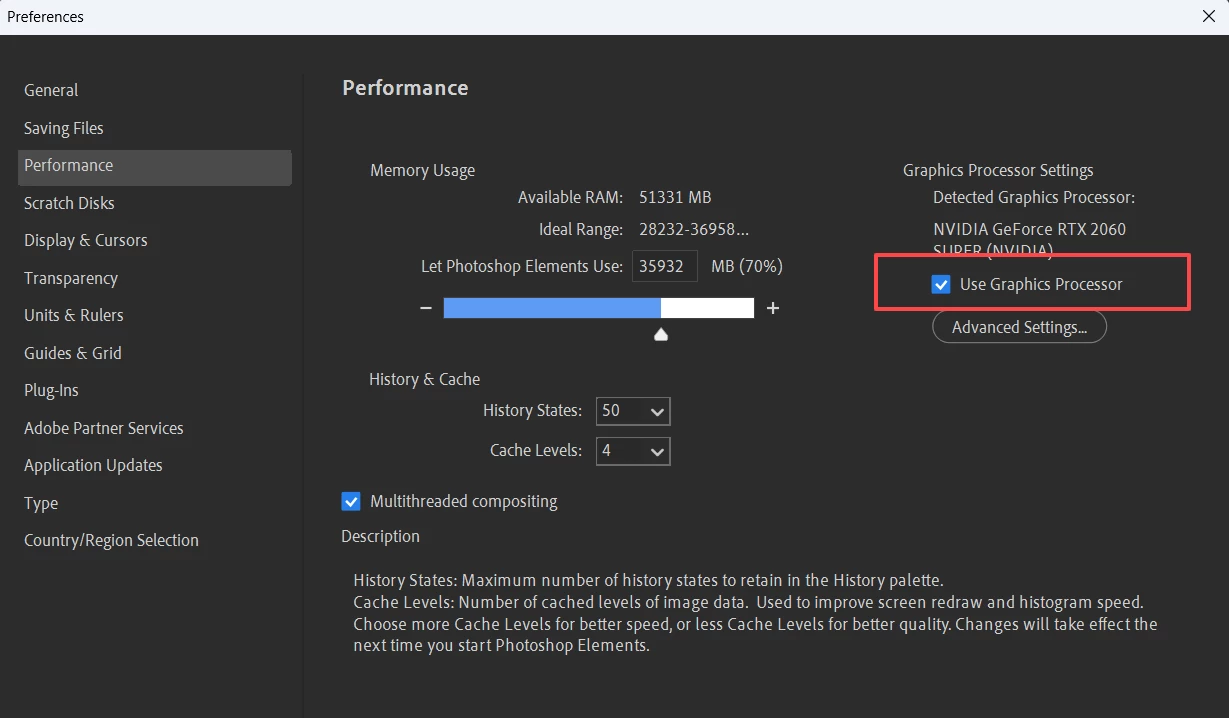
Go to the Edit>Preferences>Performance dialog and change the setting of the Use Graphics Processor box. Either check or uncheck it.
Also, have you opened a file in the Editor before going to the Guided edit tab? I don't think any guided edit will work without having an open image to work on. But usually it is possible to at least get to the Guided tab.
When all else fails, uninstall/reinstall. And if you are still having problems, try contacting Elements support. You can start a chat session by going to the Contact Adobe Support page. (https://helpx.adobe.com/contact.html?rghtup=autoOpen) Make sure you are signed into your Adobe account and try typing Agent when the chat window opens. (If you use my link, the chat window should open automatically.) (At this time of year, you may have difficulty getting through to Support.)
Please report back what happens.
Already have an account? Login
Enter your E-mail address. We'll send you an e-mail with instructions to reset your password.


 AdChoices