Participant
November 20, 2019
Answered

Photoshop Elements 8 Editor suddenly slow to open

  • November 20, 2019
  • 4 replies
  • 1802 views

Suddenly, out of the blue, the Editor on my Elements 8 is very slow to open (takes about a minute). Was previously instantaneous. Can't think why. I would appreciate any suggestions as to what may be causing this.


{Thread title edited by moderator}

This topic has been closed for replies.
Correct answer Jeff Arola

It seems that the long launch time only occurs when there is an active internet connection, at least that's what happens here when using the pse 8 Welcome Scrren to launch the pse 8 editor.


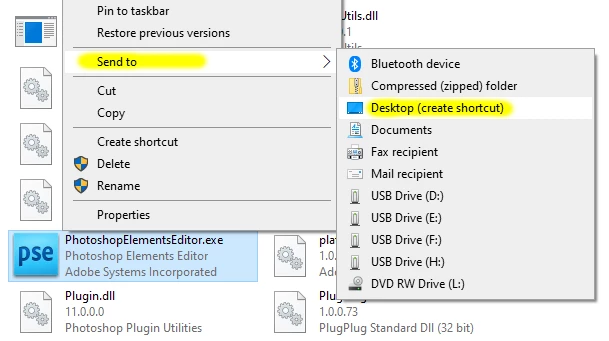
I suggest you skip using the welcome screen and put shortcuts on your desktop that link directly to the pse 8 editor and pse 8 organizer.


Go to

C:\Program Files (x86)\Adobe\Photoshop Elements 8.0

right click on the

PhotoshopElementsEditor.exe

then Send to>Desktop (create shortcut)


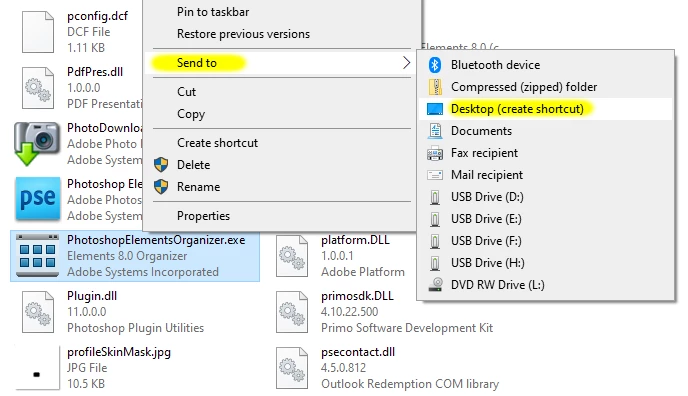
Do the same for the pse 8 organizer by going to

C:\Program Files (x86)\Adobe\Elements Organizer 8.0

right click on the

PhotoshopElementsOrganizer.exe

then Send to>Desktop (create shortcut)


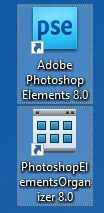
on the desktop
 

4 replies

Participant
January 10, 2020


<meta http-equiv="content-type" content="text/html; charset=UTF-8" />


So far so good - it works perfectly, thanks.  Such a simple fix,
such a great result, let's hope it continues to work the way it
should.


Cheers,


Bernie


Participant
September 5, 2022

This problem persist also running windows 11. Even when using the shortcut to PhotoshopElementsEditor.exe.

The only way around this problem seems to be turning of the internet connection.  Someone having an idea what courses this problem ?

Jeff Arola
Community Expert
Jeff ArolaCommunity ExpertCorrect answer
Community Expert
January 10, 2020

It seems that the long launch time only occurs when there is an active internet connection, at least that's what happens here when using the pse 8 Welcome Scrren to launch the pse 8 editor.


I suggest you skip using the welcome screen and put shortcuts on your desktop that link directly to the pse 8 editor and pse 8 organizer.


Go to

C:\Program Files (x86)\Adobe\Photoshop Elements 8.0

right click on the

PhotoshopElementsEditor.exe

then Send to>Desktop (create shortcut)


Do the same for the pse 8 organizer by going to

C:\Program Files (x86)\Adobe\Elements Organizer 8.0

right click on the

PhotoshopElementsOrganizer.exe

then Send to>Desktop (create shortcut)


on the desktop

 

Participant
January 10, 2020

Hello Jeff,

Thank you for your reply and your help. Yes that seems to have done the trick (so far). Nevertheless, it remains a mystery why the problem suddenly presented itself (with the welcome screen) when Editor had opened perfectly from the welcome screen for years, even during an active internet connection.

Thanks again,

Dan

Legend
January 9, 2020

All I got from Adobe systems is that they don’t support PE 8.0 anymore and they suggested I upgrade to the latest edition! That made me a tad suspicious! ... Very odd!

Suspicious of what exactly?  Hope you'll find this helpful.

Participant
January 9, 2020

Thanks for the info, Phinny - much appreciated. It's a shame that the product is unsupported but I guess I'll live with it for the moment too.  It does everything I need it to do so I would prefer not to have to purchase a new licence.

nikunj.m
Community Manager
Community Manager
November 21, 2019

Hi there,


Would you mind sharing the operating system version you are currently using?


You can try to reset the preferences of Photoshop Elements to check if that helps. Check the steps in the link below.

https://helpx.adobe.com/in/photoshop-elements/kb/preference-file-locations-photoshop-elements.html#Restoredefaultpreferences


Regards,

Nikunj

Participant
November 21, 2019

Hi Nikunj,


Thanks for replying. No it doesn't seem to be that. I'm using a PC with Windows 10. Just to be clear: Photoshop Elements launches normally. When I then select Editor I get this 30 to 60 second delay in Editor launching. After that all operates normaly. I can live with it but I just wondered if anyone had experienced the same and if there was a simple solution. This only started happening very recently.

Regards,

Silhillian

Participant
January 8, 2020

I've had exactly the same problem - around 60 seconds to load on a highly-specced PC, exactly the same symptoms as you describe.  Did you ever find out what the probelm was?  I tried deregistering, uninstalling then reinstalling.  Worked fine first time then a 60 second delay on the second launch.  I've used PE8.0 for years with no problems.  Would love some suggestions!
