Participant
Nov 1, 2023 6:17 PM UTC
Answered

Photoshop Elements 9 : unable to use due to Direct x issue

Hi

I'm hoping someone can help me.

I haven't used Elements 9 for a good number of years.

Now I've retired, I have more time to start to use my copy of Elements 9.

I appreciate it's a really old version but I'd like to see if I can use it to post process raw images I've collected on a recent photography tour.

Unfortunately, when I start the program up I encounter a pop up message saying I need Direct x in order to use Elements.

Using the dxdiag run command, I can see that I have Direct Version 12 installed on my Windows 10 laptop.

I can also see that successive Ms updates have placed lots of directx files in c:windows folders.

Did anyone else encounter this issue and does anyone remember what the solution was?

 

This topic is closed to new replies. Start a new post to keep the conversation going.
Jeff Arola
Jeff ArolaCorrect answer
Community Expert
Nov 1, 2023 8:36 PM UTC

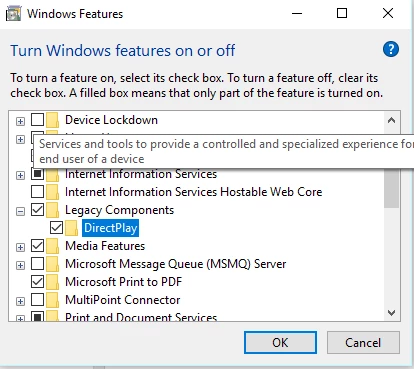
I think you need to turn on DirectPlay as described below from this thread:

https://community.adobe.com/t5/photoshop-elements-discussions/phtoshop-elements-12-can-not-find-quot-directx-directplay-quot/td-p/9107095#9540653


- Click "Start Button"

- Type "Turn Windows Feature On & Off"


- Open it

- Check for "Legacy Components"

- Click the + sign

- Check "Direct Play"


- Click "Ok"

5 replies

Jeff Arola
Community Expert
Jeff ArolaCommunity ExpertCorrect answer
Community Expert
Nov 1, 2023 8:36 PM UTC

I think you need to turn on DirectPlay as described below from this thread:

https://community.adobe.com/t5/photoshop-elements-discussions/phtoshop-elements-12-can-not-find-quot-directx-directplay-quot/td-p/9107095#9540653


- Click "Start Button"

- Type "Turn Windows Feature On & Off"


- Open it

- Check for "Legacy Components"

- Click the + sign

- Check "Direct Play"


- Click "Ok"

Translate
Participant
Nov 2, 2023 2:21 PM UTC

Thanks for your reply Jeff

After posting my issue I found the same solution elsewhere on the Adobe community site (turning on Legacy Components for DirectX).

It worked perfectly after a reboot so all's good (except I then stayed up until 3am using Elements 😉)

Thanks for taking the time out of your day to respond - it's greatly appreciated 

Steve

Translate
Greg_S.
Community Expert
Community Expert
Nov 1, 2023 6:35 PM UTC

Try running Elements 9 in compatibility mode.  Go to the C:\Program Files (x86)\Adobe\Photoshop Elements 9 folder and find the ElementsEditor.exe file.  Right-click on the file and choose Properties from the context menu.  This will bring up a dialog with a Compatibility tab.  Use that to select a compatibility mode.  Here is a screenshot of the dialog in Win 11, but Win 10 should have something similar.  If you are still having difficulty, try running the Compatibility Troubleshooter.


Translate
Participant
Nov 2, 2023 2:19 PM UTC

Thanks for your reply Greg.

After posting my issue I found a solution elsewhere on the Adobe community site.

Jeff Arola also directed me to the same solution (turning on Legacy Components for DirectX).

it worked after a reboot somall'dps good (except I then stayed up until 3am using Elements 😉)

thanks for taking the tme out if your day to respond - it's greatly appreciated 

Steve

Translate