

Valentina ♡
Inspiring
August 25, 2023
Answered

Photoshop Elements dark mode and pen tool?

  • August 25, 2023
  • 1 reply
  • 585 views

Hello, I'm testing the trial version of Adobe Elements, and I've some questions.


There's a way to have a dark mode? (I read many have problems of photosensitivity (and me too) and the white mode is not good for my eyes...I hope is possible with pse 2023?

2. There is the pen tool? I still didn't find yet this tool..


3. There is the possibility once one purchase the full Photoshop elements , to change language? I mean, Im trying the Italian version but I would like also from time to time, change the language and use english version, as the tutorials online are most in English and is more simply (even if I'm italian) for me learn with english tutorials. But at the same time, if I purchase it, I prefer Italian, but if I could switch from italian to english , it would be great! 


Thank you for the informations 🙂
 

This topic has been closed for replies.
Correct answer Glenn 8675309

Also, I wonder how to do the tool about pick up color (I) with a drawing tablet?
For example, when I need to use the brush (B) with my keyboard I can press ALT and the brush temporanely become the (I) tool (sorry don't know in english the word), and then it return automatically in brush and I paint. So I keep picking up the color and painting .
I need to do this with a drawing table, but with a pen, I don' t know how to assign a specific command for example on the pen of the tablet, or if photoshop element have a way to press ALT when one use a drawing table?

Thanks again for the help! 


With my tablet "Huion" brand I have 2 buttons on my stylus I can use to select things.   I find myself using the tablet stylus with one hand, and keep my right hand on my mouse to select some things so  I don't have to move my hand holding the stylus as much.

I can hover , with my stylus, over a tool to select it, Or I can click one of the buttons on the stylus to select it without hovering over it. 

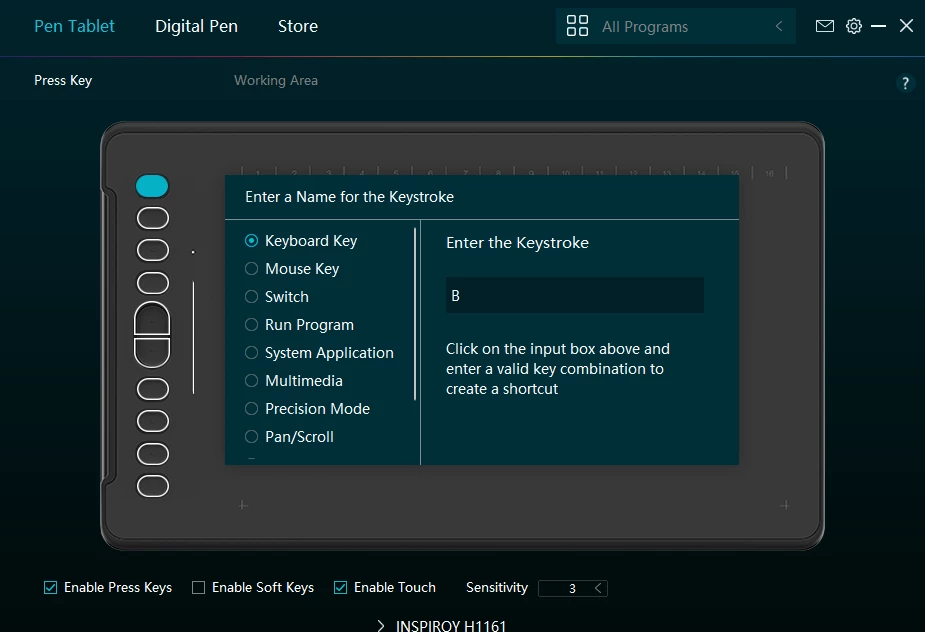
Each tablet has it's own interface- I have tons of options I can assign to buttons on my tablet- if I choose to do so-- which I have not yet done-  I just plugged it  in and starting using it after installing to basic software for it. 

You should have software for your tablet where you can assign special functions..   I have not done any of  that and choose to use a combination of tablet and mouse. 

In the Image below I have a row of buttons on the left side of my tablet I can assign things to---  I have not done that- I prefer to keep my eyes on my screen, so I use a combination of tablet and mouse.

1 reply

Glenn 8675309
Legend
August 25, 2023

1. No dark mode

Pen tool?  NO.  There is a pencil tool.  Not quite sure what you mean by pen tool.   I use a pen with my drawing tablet- which is different.

The language is chosen during installation.   If you want to change from English to Italian:  Log out of the editor.   Uninstall it. Reinstall it choosing Italian. 


Valentina ♡
Inspiring
August 25, 2023

Thank you for the informations!

Valentina ♡
Inspiring
August 25, 2023

Also, I wonder how to do the tool about pick up color (I) with a drawing tablet?
For example, when I need to use the brush (B) with my keyboard I can press ALT and the brush temporanely become the (I) tool (sorry don't know in english the word), and then it return automatically in brush and I paint. So I keep picking up the color and painting .
I need to do this with a drawing table, but with a pen, I don' t know how to assign a specific command for example on the pen of the tablet, or if photoshop element have a way to press ALT when one use a drawing table?

Thanks again for the help!