

Andrejj_T
Participating Frequently
December 10, 2023
Question

Photoshop Elements v21 (i.e. 2023) became WORSE after upgrading NikCollection plug-ins!

  • December 10, 2023
  • 3 replies
  • 723 views

Hello fellow community participants!


Back in time I've used the old Photoshop Elements (32-bit v9) on an old Mac for long, but some years ago I switched to newer (64-bit edition version 21). Now I run Photoshop Elements this along with some very good plug-ins called Nik Collection (from DxOLabs) – all on top of macOS 12.7.1. As long as I used Nik Collection 6.0 everything worked fine. But when I upgraded Nik Collection from 6.0 to 6.3, some things started going wrong 😞 Suddely, the Nik tool «Dfine» wouldn’t open RAW files any more, rether it insisted on being "fed" with JPEGs only!


This was very strange, so I contacted DxOLabs support. But without much help. Their representative kept asking silly questions and told me to do things that really didn’t lead to anything 😞 Thus my hopes were high when another release of Nik Collection (6.5) came out, and I tried upgrading again. Now my system seems to have become haunted by "randomness": Sometimes when I launch Photoshop Elements I can actually carry out some regular photo editing, but most times even the basic image rendering within Photoshop Elements has become distorted – phots are displayed far more coarsely than they actually are! (see illustration below).
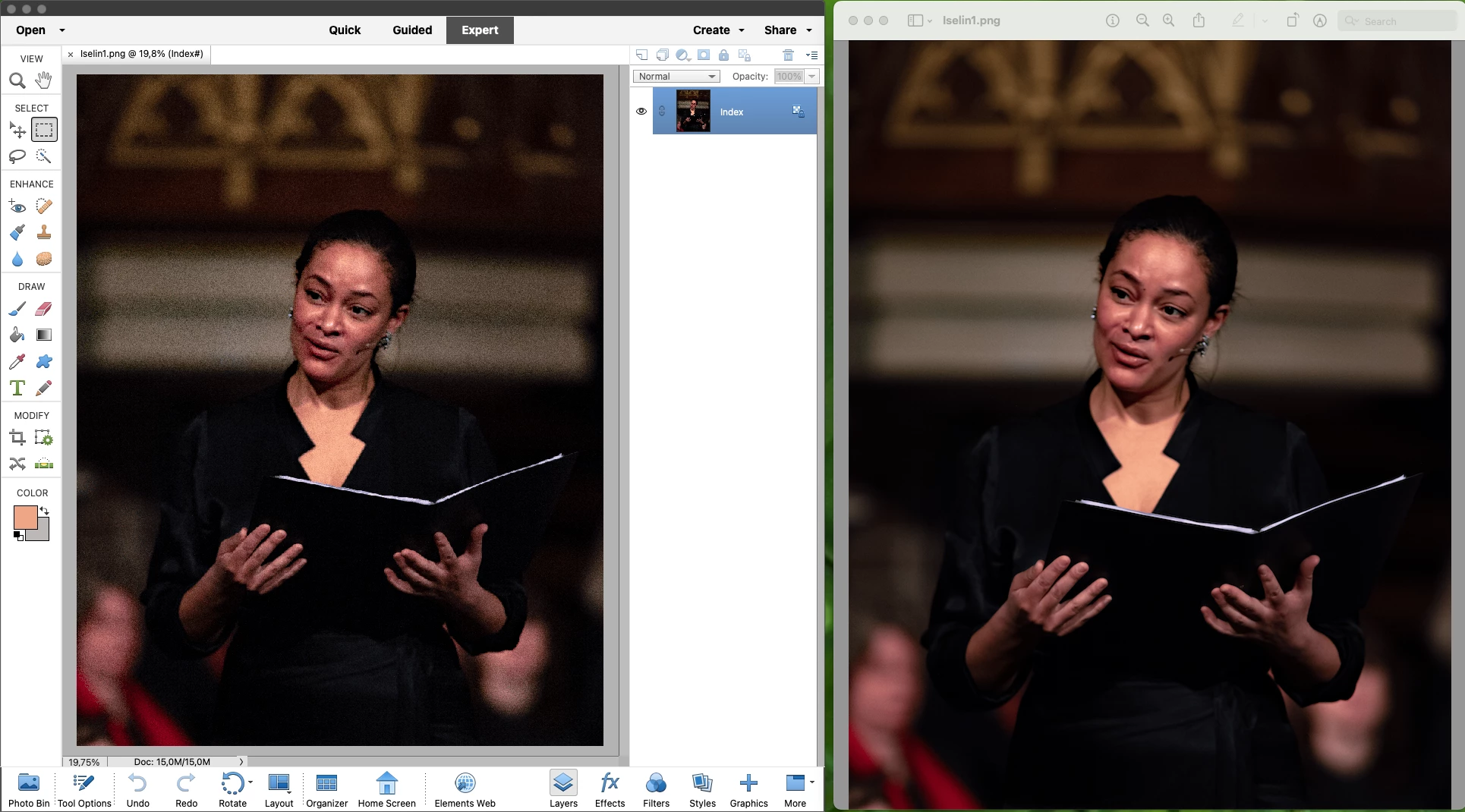
 

I have reinstalled both products, but without any improvment. Besides, there is another indication that the installation has gone wrong: Menu entries appear DOUBLE, but without any of the entries leading anywhere… (again: see attached illustration)
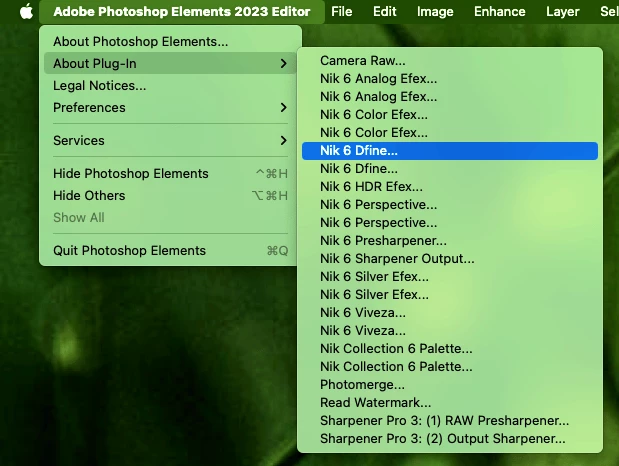
 

I’ve reached the conclusion that I need to de-install both applications before I start over. But before I do so, I’d like to know if there are any other (or more profound) steps I should pursue – in order to ensure that I RINSE OUT EVERY TRACE before re-installing.


If you know anything about how Adobe Photoshop Elements (along with plug-ins) can be COMPLETELY removed, I would be grateful it if you shared that with me! In the mean time I may have no choice but to switch back to Serif Affinity Photo.


Best regards from André T. (in Norway)

This topic has been closed for replies.

3 replies

Andrejj_T
Andrejj_TAuthor
Participating Frequently
December 10, 2023

Well, now I’ve found, read (carefully) and ran the procedures as decribed in these two recipes:

* for Photoshop El.: https://helpx.adobe.com/photoshop-elements/kb/uninstall-premiere-elements-photoshop-elements.html

* for the Nik Coll. plug-ins: https://forum.dxo.com/t/nik-cleanup-tool/27933/5

Beware that Photoshop El. requires re-insertion of license keystring, as well as a separate re-installation of Camera Raw (in which the release level remains the same; 14.4). The footprint on disk is 1.38GB (in comparison, Affinity Photo 1.10.x – which I also reinstalled, in order to be re-paired with a clean set of Nik plug-ins – weights in at 2.63GB. This one doesn’t require any additions to congest raw files). But after the Nik installation PSE still did NOT discover that additional plug-ins had been installed. Neither after I had added the path statement (…/Applications/Adobe Photoshop Elements 2023/Support Files/Plug-ins/) and restarted the application. PSE discovers that the plug-ins are there, but the integrated tool pallette (used for launching apps) would not show up. Not until I manually chose the File > Automation Tools > Nik Collection 6 Palette menu option.  And STILL, even if I selectively press e.g. the Nik 6 Dfine palette button/icon, and there IS a brief spinning of the cursor wheel – plus some temporary creation of sub-layers in the Layers panel (on the right-hand side of the screen) …but still nothing! And if I click on e.g. the Nik 6 Sharpener button I get «Could not complete the Sharpener Pro 3: (2) Output sharpener because of a problem with the filter module interface». While if I I click on the Nik 6 Perspective button I just get a modal dialog box stating a «The function is currently not available.» message (see below).


I really can’t say that this entire Nik Collection 6 plug-in product actually seems MORE broken/defect to me after this version 6.5 upgrade than earlier (i.e. after the previous 6.3 upgrade). Ouch.

Andrejj_T
Andrejj_TAuthor
Participating Frequently
December 10, 2023

- I thank you! 🙂

jane-e
Community Expert
Community Expert
December 10, 2023

@Andrejj_T 


I've moved your post to Photoshop Elements


Jane

Andrejj_T
Andrejj_TAuthor
Participating Frequently
December 10, 2023

Hi Jane, Thanks but that may mean that there are two similar entries there - since I posted the same content there as well.

Ged_Traynor
Community Expert
Community Expert
December 10, 2023

@Andrejj_T try posting your query on the Photoshop Elements forum