Participant
April 1, 2022
Answered

Photoshop Essentials 2021 - Windows Menu - Items Greyed out

  • April 1, 2022
  • 2 replies
  • 500 views

I have opened up an existing PSD file I created in an older version of Photoshop Essentials. I can add text to the image but the Layer option in the Windows pull down menu is greyed out (as are many other options).


I can select Layers on the image but no Layers tab shows up at the top right of the program area.


Is there something I need to do to get this work?

This topic has been closed for replies.
Correct answer Greg_S.

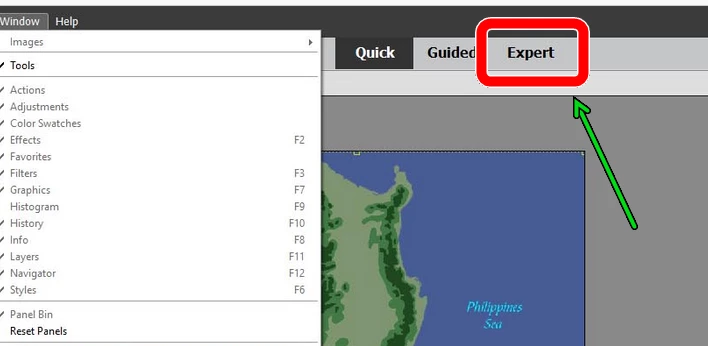
Layers are not available in Quick Mode which is the default mode when you first launch Photohsop Elements. You need to change to the Expert tab:


2 replies

Greg_S.
Community Expert
Greg_S.Community ExpertCorrect answer
Community Expert
April 1, 2022

Layers are not available in Quick Mode which is the default mode when you first launch Photohsop Elements. You need to change to the Expert tab:


Participant
April 9, 2022

That worked. Thanks!

Chris 486
Community Expert
Community Expert
April 1, 2022

HI William!


To clarify, are you opening your old file in Photoshop, or Photoshop Elements?

Can ou also share a screenshot of waht you are seeing with the whole Photoshop window visible?


Thanks!

Participant
April 1, 2022

Yes, its from Photoshop Elements 2.0 - a much older version that used to come free with PCs. I have Photoshop Essentials 2021 (19.0 - I just did latest update today). Screenshot is attached.


Ged_Traynor
Community Expert
Community Expert
April 1, 2022

I'll move the thread to the Photoshop Elements forum