Inspiring
December 11, 2019
Answered

Picture missing in Organizer despite present in Catalogue

  • December 11, 2019
  • 1 reply
  • 1067 views

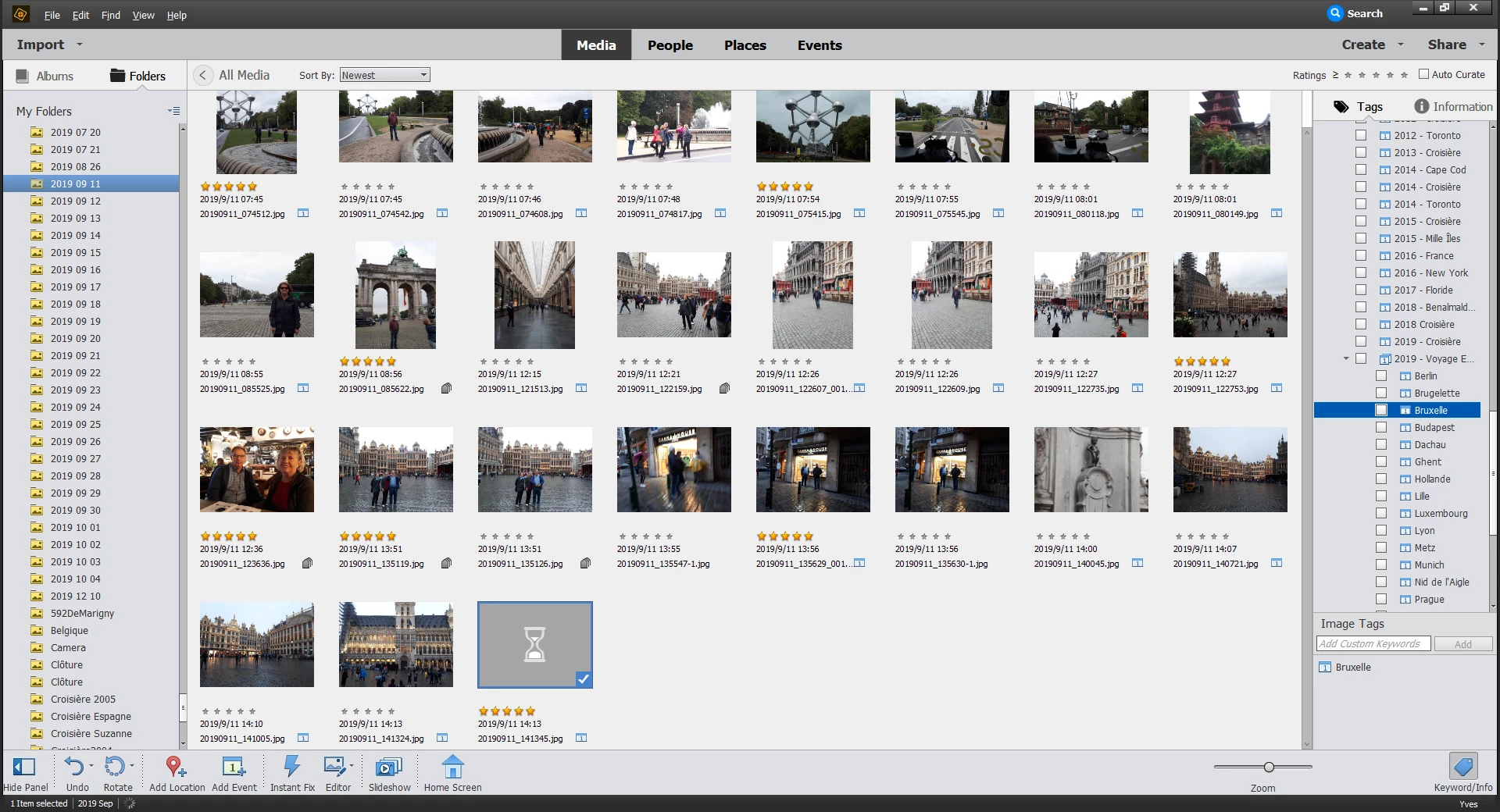
I have a picture missing in the organizer despite it is present in my Catalogue.


When I double click the picture it opens in full size in the organizer but whem I click GRID to go back to the organizer this pictures is a Sand Glass.


How can I recover that picture to show in the Organizer (buttom row of screenshot)?


This topic has been closed for replies.
Correct answer YvesB

I am glad you were able to solve that issue, your workaround is quite logical. The small disadvantage is that if you delete from catalog and from disk, you may lose links to stacks, version sets, albums or creations, even if you recover your tags and captions as well as the thumbnail.


My suggestion to delete the thumbnail cache is slow but non destructive.

- locate the catalog folder location: it's shown in your screenshot. It's a hidden folder, you may have to set the explorer to show hidden files and folders.

- In the catalog folder you find a thumb.5.cache file. You delete this file.

- you restart your computer and organizer and wait for the thumbnails to be created. Since it may require several hours, do it as a night job.


Hi Michel,


Thanks for the tip.


I found "thumb.5.cache" using File Explorer.


Greatly appreciated

1 reply

MichelBParis
Legend
December 11, 2019

Does this image open in the editor if you click on the 'editor' button in the bottom icon bar?

Can you find this image in your explorer?

Right click on the image and choose 'update thumbnail' = does it work?

What's the size of that image in pixels (file properties in the right panel)?


YvesBAuthor
Inspiring
December 12, 2019

Hi Michel,


This photo opens when I click on the Editor but it is still missing in the Organizer when I close the Editor. It is also present in its folder location and viewable in Medium Icon view. Its size in the Organizer en I choose Picture Information is 5.5 Mb and 5.7 Mb in Windows File Manager.


It's really strange. I don't know what to do to make the photo viewable as a picture in the Organizer.


Can you help me further?


Thanks,