
Inspiring
April 11, 2022
Answered

Plugins for PSE 2022

  • April 11, 2022
  • 2 replies
  • 1992 views

I have just installed PSE 2022 and I am now trying to install more than one plugin. I used 3 plugins with PSE 2019 but 2022 only allows me to install one. If I attempt to add another I just get the last one that I am trying to install. Is there a way to install more thasn one plugin?

This topic has been closed for replies.
Correct answer Greg_S.

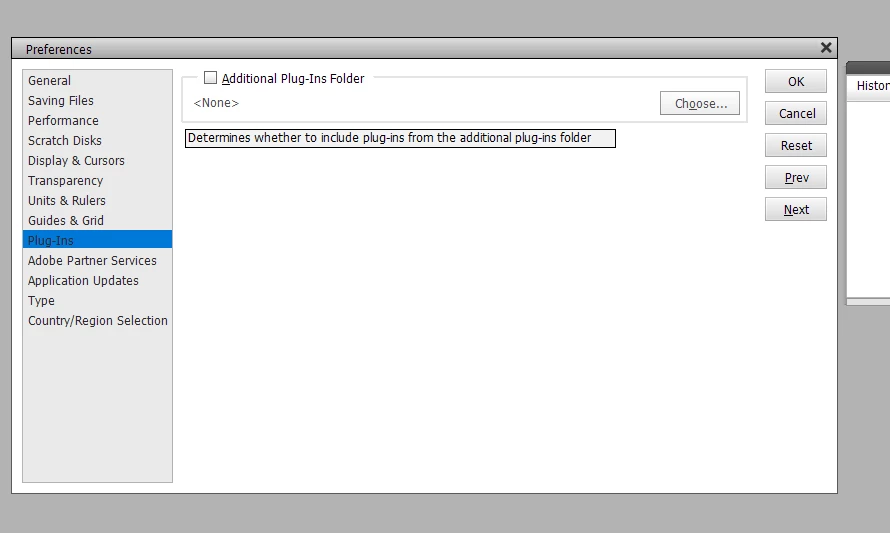
It sounds like you are using the Preferences>Plug-ins>Additional Plug-in Folder checkbox:

If that is the case, then I can see why you are only able to use one plug-in (publisher) at a time.  Your plug-in installers should be putting the plug-ins into the default folder, which for Elements 2022 is found at:

C:\Program Files\Adobe\Photoshop Elements 2022\Plug-Ins.


Do you have any plug-in files or folders in that default location?  If your plug-installer did not place them in that location, you can copy the plug-in files there - and they should all show up.


2 replies

Greg_S.
Community Expert
Greg_S.Community ExpertCorrect answer
Community Expert
April 13, 2022

It sounds like you are using the Preferences>Plug-ins>Additional Plug-in Folder checkbox:

If that is the case, then I can see why you are only able to use one plug-in (publisher) at a time.  Your plug-in installers should be putting the plug-ins into the default folder, which for Elements 2022 is found at:

C:\Program Files\Adobe\Photoshop Elements 2022\Plug-Ins.


Do you have any plug-in files or folders in that default location?  If your plug-installer did not place them in that location, you can copy the plug-in files there - and they should all show up.


PrakticalAuthor
Inspiring
April 13, 2022

Thanks Greg

That has done the trick. I am very grateful for your assistance.

Greg_S.
Community Expert
Community Expert
April 11, 2022

Which plug-ins are you trying to install?  Can you tell us exactly what happens when you install the second plug-in. Based on what you have said so far, the problem seems to be with your plug-in setup file or how you are installing it.   Or are you simply copying the files between plug-in folders?


But to answer your question, there should be no problem installing three (or more) plug-ins. 

PrakticalAuthor
Inspiring
April 11, 2022

Hello Greg

With PSE 2019 I was able to use the Nik Collection and Skylum's Luminar Flex and Luminar AI all as plugins.

I can install any one of these but when I then try to add another that  just replaces the first rather  adding to it. I am not copying files between plugin folders; I wouldn't know how.

PrakticalAuthor
Inspiring
April 13, 2022

I have made some progress. If I chose the Skylum folder as a plugin, I get all the Skylum programmes that I have purchased in the filters list. I even tried their new Neo as a plugin and it worked. However if I want to use the Nik Collection, when I choose this as a plug in I loose the Skylum stuff.

I purchased PSE2022 because if I updated to the latest update of Nik using 2019, it crashed the editor. Looks like I just purchased a different problem instead