
Participant
October 17, 2025
Answered

Premiere Elements 2025 will no finish loading

  • October 17, 2025
  • 2 replies
  • 154 views

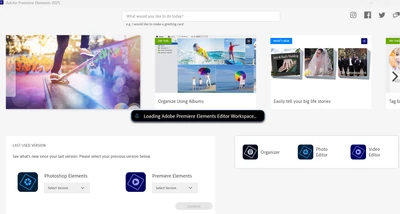
When I select either Premiere Element or Photo Shop Elements, it opens some type of home screen.  From that screen,  I select either the Photo Editor or Video Editor and it goes into an endless loop with this message: "Loading Adobe Primiere Elements Editor Workspace..."

I have already ininstalled and reinstalled both programs and rebooted the computer several times. 


Correct answer Greg_S.

Are you upgrading from a previous version of Elements?

Can you open, and do you use, the Organizer?

If you use the Organizer have you converted a prior catalog?

Can you launch the Editor by going to the C:\Program Files\Adobe\Photoshop Elements 2025 folder and clicking on the PhotoshopElementsEditor.exe file.

2 replies

Greg_S.
Community Expert
Greg_S.Community ExpertCorrect answer
Community Expert
October 18, 2025

Are you upgrading from a previous version of Elements?

Can you open, and do you use, the Organizer?

If you use the Organizer have you converted a prior catalog?

Can you launch the Editor by going to the C:\Program Files\Adobe\Photoshop Elements 2025 folder and clicking on the PhotoshopElementsEditor.exe file.

KenKilAuthor
Participant
October 20, 2025

This lap top is brand new so no version of the programs have been used on it yet.     Even though both  PhotoshopElements_2025_LS30_win64.exe has been installed,  the final step on previous computers  had been selecting the Photo Editor from the home screen, to finish the installation.   .  PhotoshopElementsEditor.exe isn't in the program files yet. .   

Nancy OShea
Community Expert
Community Expert
October 17, 2025

See Elements' system requirements.

https://helpx.adobe.com/photoshop-elements/system-requirements.html

https://helpx.adobe.com/premiere-elements/system-requirements.html


[A moderator moved this from Download & Install to Photoshop Elements.]


Nancy O'Shea— Product User & Community Expert
KenKilAuthor
Participant
October 18, 2025

Yep, my laptop exceed the recommended  specs for the programs.